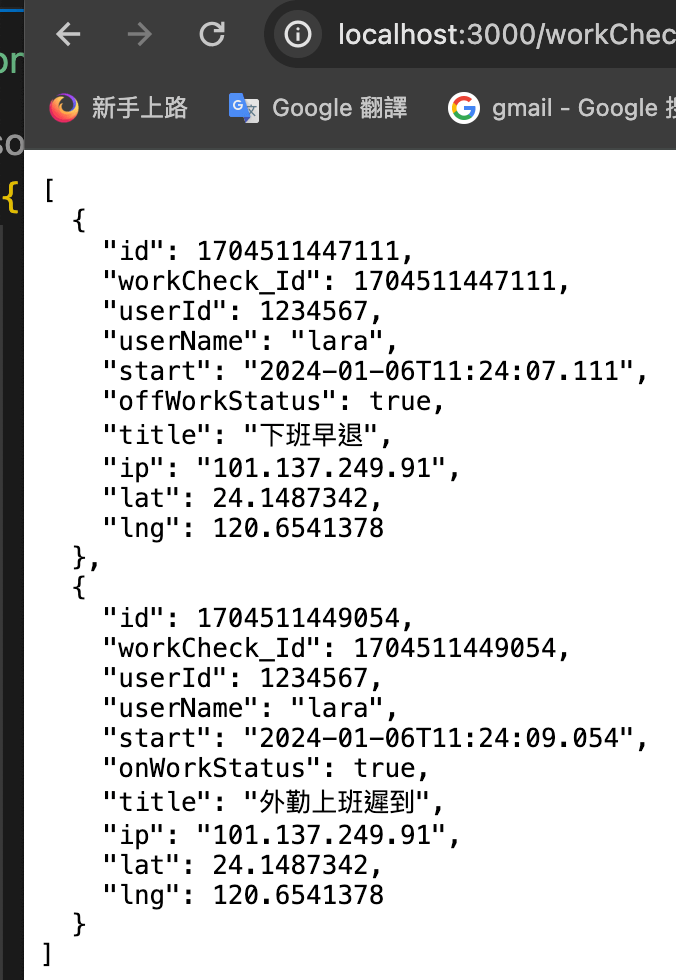
reduce() 累加器

reduce() 累加器

reduce() 方法將一個累加器及陣列中每項元素(由左至右)傳入回呼函式,將陣列化為單一值。
組成結構

1
2
arr.reduce(callback[accumulator, currentValue, currentIndex, array], initialValue)
arr.reduce(回調[累加器,當前值、目前索引、數組],初始值)

callback:用於處理陣列中每個元素的函式,可傳入四個參數

  • accumulator用來累積回呼函式回傳值的累加器(accumulator)或 initialValue(若有提供的話,詳如下敘)。累加器是上一次呼叫後,所回傳的累加數值。
  • currentValue原陣列目前所迭代處理中的元素。
  • currentIndex 選擇性原陣列目前所迭代處理中的元素之索引。若有傳入 initialValue,則由索引 0 之元素開始,若無則自索引 1 之元素開始。
  • array 選擇性呼叫 reduce() 方法的陣列。
  • initialValue 選擇性於第一次呼叫 callback 時要傳入的累加器初始值。若沒有提供初始值,則原陣列的第一個元素將會被當作初始的累加器。假如於一個空陣列呼叫 reduce() 方法且沒有提供累加器初始值,將會發生錯誤。
回傳值
reduce js 累加總和
1
2
3
const numbers =[1,2,3,4,5];
const sum = numbers.reduce((acc,cur)=> acc + cur);
console.log('sum 總和', sum) //sum 總和 15
reduce js 累乘總和
1
2
3
const numbers =[1,2,3,4,5];
const multiplication = numbers.reduce((acc,cur)=> acc * cur);
console.log('multiplication 累乘總和', multiplication) // multiplication 累乘總和 120
算出訂購單總和
  • 使用map:取出陣列的price
  • 使用reduce:累計加總
1
2
3
4
5
6
7
8
const orderItem =[
{name:'apple',price:25,qty:1},
{name:'orange',price:10,qty:1},
{name:'piniaApple',price:45,qty:1},
]

const sumOrder = (orderItem) => orderItem.map((item,index)=>item.price).reduce((arr,cur)=>arr+cur)
console.log('sumOrder 加總',sumOrder(orderItem))
reduce 計算相同元素數量並物件取出值轉為陣列
這裡用到

js 遇到的問題

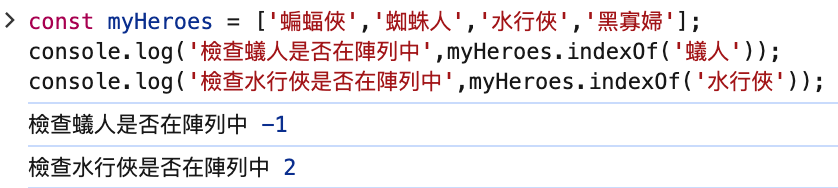
檢查某元素是否在陣列中 indexOf

-1=>沒有找到
2=>索引2 =>找到的元素

1
2
3
4
5
const myHeroes = ['蝙蝠俠','蜘蛛人','水行俠','黑寡婦'];
console.log('檢查蟻人是否在陣列中',myHeroes.indexOf('蟻人'));
console.log('檢查水行俠是否在陣列中',myHeroes.indexOf('水行俠'));
//檢查蟻人是否在陣列中 -1
//檢查水行俠是否在陣列中 2

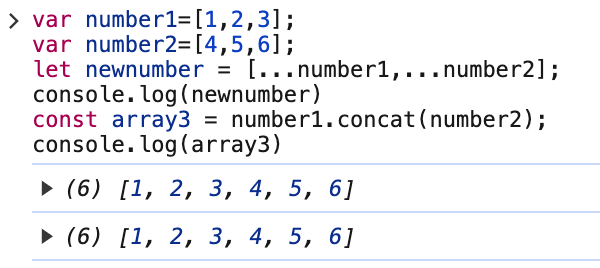
合併陣列 javascript(ES6)擴展運算子 Spread Operator 或是 concat ()

1
2
3
4
5
6
7
8
var number1=[1,2,3];
var number2=[4,5,6];
let newnumber = [...number1,...number2];
console.log(newnumber)
//(6) [1, 2, 3, 4, 5, 6]
const array3 = number1.concat(number2);
console.log(array3)
//(6) [1, 2, 3, 4, 5, 6]

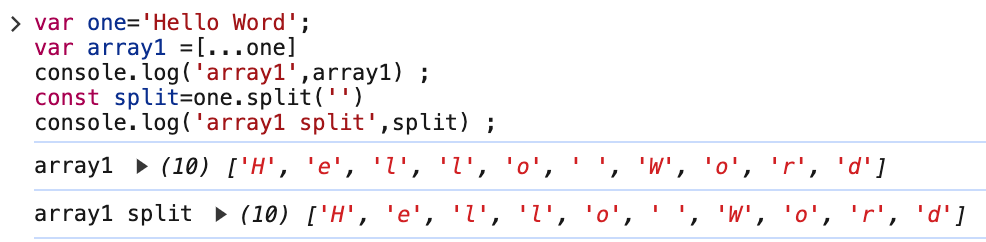
字符串轉字符數組(分割字符串) javascript(ES6)擴展運算子 Spread Operator 或是 split(‘’)

1
2
3
4
5
6
7
var one='Hello Word';
var array1 =[...one]
console.log('array1',array1) ;
//(10) ['H', 'e', 'l', 'l', 'o', ' ', 'W', 'o', 'r', 'd']
const split=one.split('')
console.log('array1 split',split) ;
//(10) ['H', 'e', 'l', 'l', 'o', ' ', 'W', 'o', 'r', 'd']

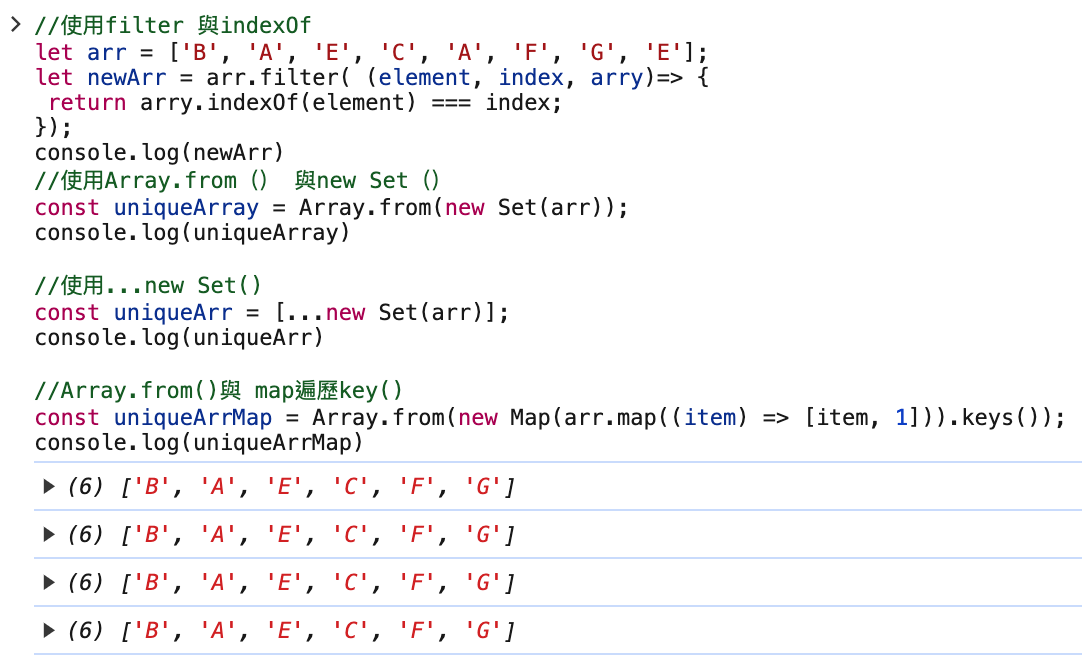
去掉重複的元素

1
2
3
4
5
6
7
8
9
10
11
12
13
14
15
16
17
18
19
20
21
//使用filter 與indexOf
let arr = ['B', 'A', 'E', 'C', 'A', 'F', 'G', 'E'];
let newArr = arr.filter( (element, index, arry)=> {
return arry.indexOf(element) === index;
});
console.log('使用filter 與indexOf',newArr)
//(6) ['B', 'A', 'E', 'C', 'F', 'G']

//使用Array.from() 與new Set()
const uniqueArray = Array.from(new Set(arr));
console.log('使用Array.from() 與new Set()',uniqueArray)
//(6) ['B', 'A', 'E', 'C', 'F', 'G']

//使用...new Set()
const uniqueArr = [...new Set(arr)];
console.log('使用...new Set()',uniqueArr)
//(6) ['B', 'A', 'E', 'C', 'F', 'G']

//Array.from()與 map遍歷key()
const uniqueArrMap = Array.from(new Map(arr.map((item) => [item, 1])).keys());
console.log('uniqueArrMap',uniqueArrMap)

物件轉陣列

1
2
3
4
5
6
7
8
9
10
11
12
13
14
15
16
17
18
19
20
21
22
23
24
25
26
27
28
29
30
31
32
33
34
35
//物件形式
const roles = {
'001': {
name: '海綿寶寶',
expert: '吸收很快',
},
'002': {
name: '耶夢',
expert: '任意門',
},
'004': {
name: '超人',
expert: '英雄',
},
};

//使用Object.values與forEach()
let str = [];
str=Object.values(roles).forEach((item) => {
console.log(item);
})
console.log(str)

//使用Object.keys與forEach()
let object = [];
object=Object.keys(roles).forEach((key) => {
console.log(roles[key]);
})
console.log(object)

let objectEntries = [];
Object.entries(roles).forEach((obj) => {
console.log(obj[0], obj[1]);
})
console.log(objectEntries)

Vite Tailwind 安裝

建立專案

一安裝 Tailwind

1
npm install -D tailwindcss postcss autoprefixer

二建立的是 tailwind 的設定檔

1
npx tailwindcss init -p

建立完成後會發現專案根目錄多出了 tailwind.config,jspostcss.config.js這兩個檔案。

1
2
3
4
5
6
7
8
9
10
11
12
//tailwind.config.js
/** @type {import('tailwindcss').Config} */
export default {
content: [
"./index.html",
"./src/**/*.{vue,js,ts,jsx,tsx}",
],
theme: {
extend: {},
},
plugins: [],
}

將 Tailwind 指令加入您的 CSS 中

在src資料夾內新增style.css

1
2
3
@tailwind base;
@tailwind components;
@tailwind utilities;

安裝了 autoprefixer以後style 會自動產生
從main.ts引入style.css(Vite Vue 專案)

1
2
3
4
5
6
7
import { createApp } from 'vue'
import App from './App.vue'
import './style.css' //引入 tailwindcss

const app = createApp(App);

app.mount("#app");

從entry-client.ts引入style.css

在App.vue測試

1
2
3
4
5
6
7
8
9
10
   <h1 class="text-3xl font-bold underline">
Hello world!
</h1>
<div class="p-6 max-w-sm mx-auto rounded-xl shadow-lg flex items-center space-x-4 bg-slate-900 p-8 pt-7">

<div>
<div class="text-xl font-medium text-white">ChitChat</div>
<p class="text-white">You have a new message!</p>
</div>
</div>

參考官網

使用 Vite 安裝 Tailwind CSS

Vite出勤系統

最近開是在做EIP 系統,因此出勤系統就是要思考邏輯性的呈現

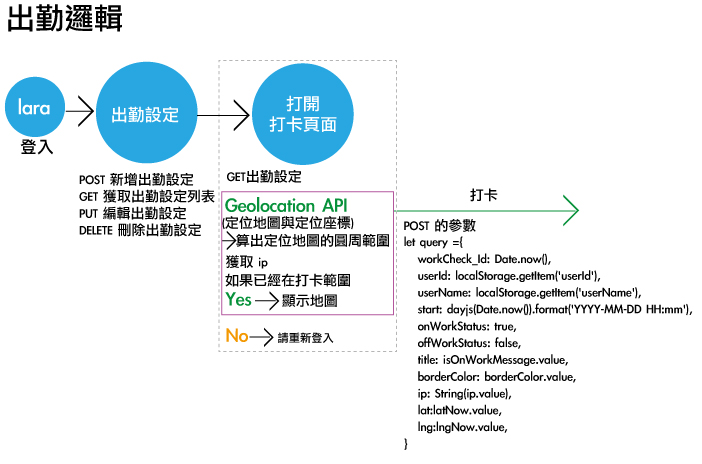
出勤打卡邏輯

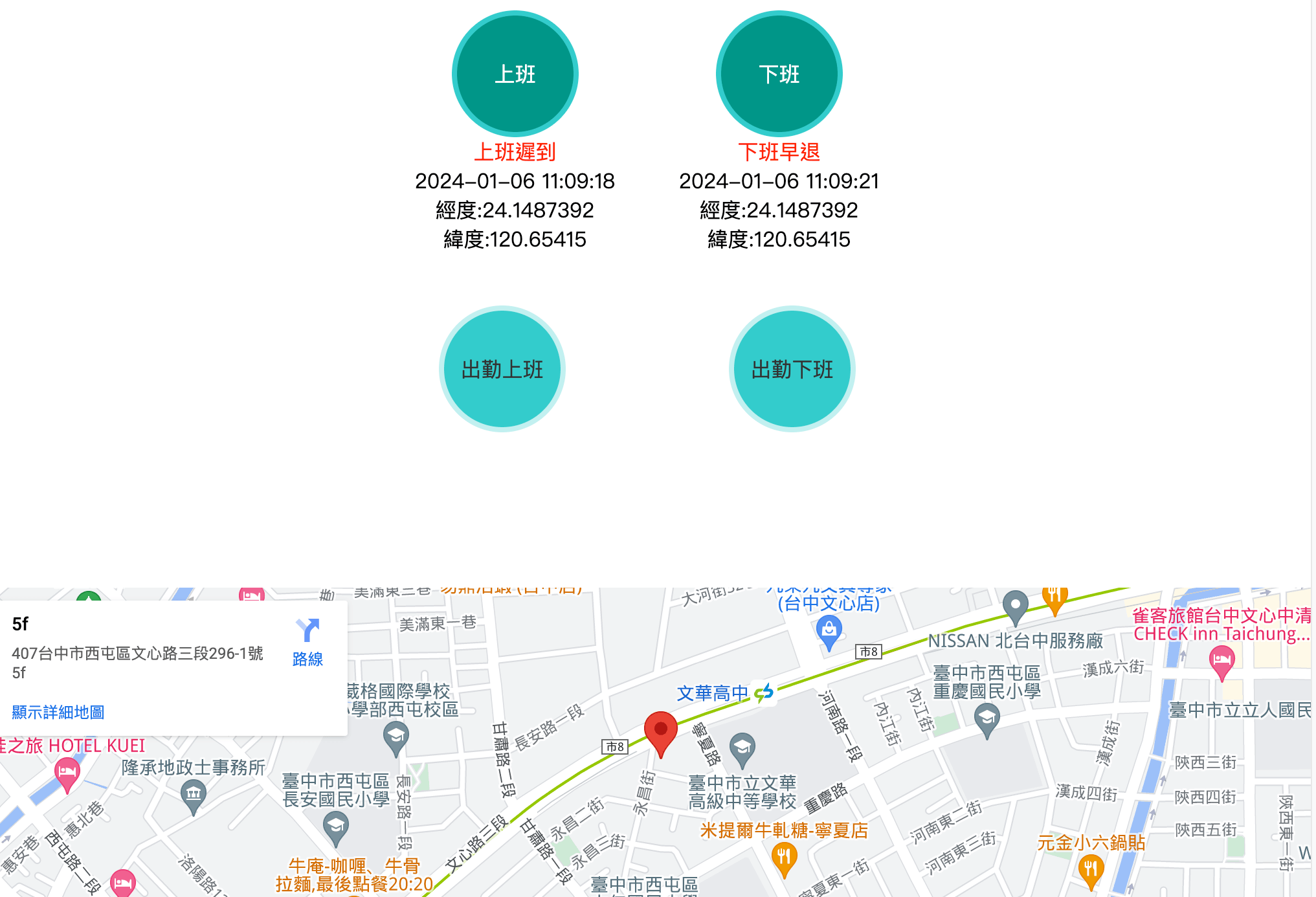
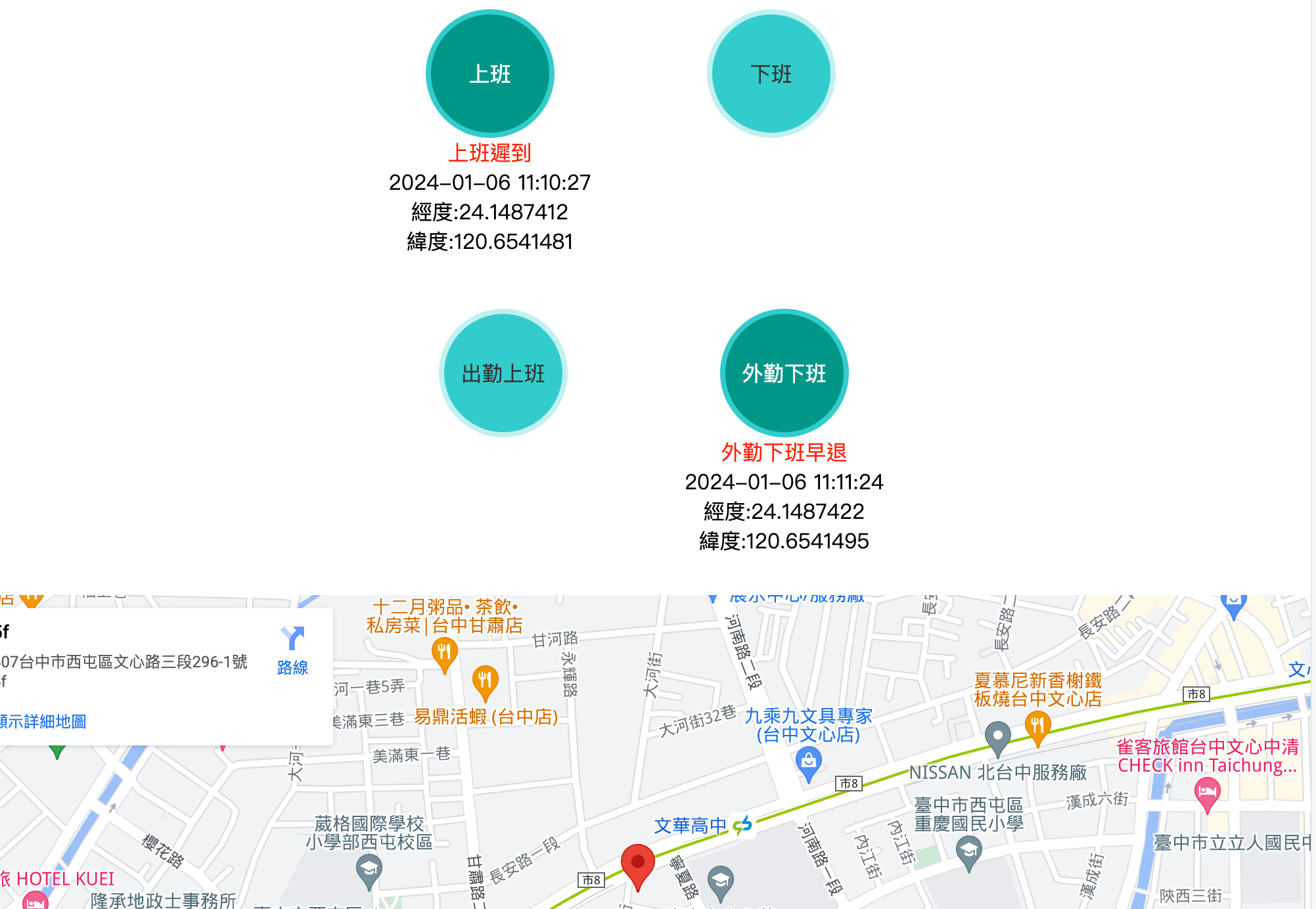
打開打卡頁面(獲取出勤設定定位地圖與定位座標)『如果已經在打卡範圍』,出現google Map 地圖 =>獲取當日過濾後的上班/外勤上班打卡列表(包含遲到:『如果已經打過卡了』或獲取當日過濾後的下班/外勤下班打卡列表(包含早退:『如果已經打過卡了』,『點擊』下班打卡或外勤下班打卡:alert 已經打過卡了),如果沒有打過上班卡/出勤上班卡 =>得到 『上班正常』或『外勤上班正常』或『上班遲到』或『外勤上班遲到』

1
2
3
4
5
6
7
8
9
10
11
12
13
14
15
16
17
18
19
20
21
22
23
24
25
26
27
28
29
30
31
32
33
34
35
36
37
38
39
40
41
42
43
44
45
46
47
48
49
50
51
52
53
54
55
56
57
58
59
60
61
62
63
64
65
66
67
68
69
70
71
72
<template>
<ul class="set_work_check">
<li v-for="(item,id) in setCheckModesMainMenu" :key="id">
<router-link
:to="item.href"
:class="{activePage: item.title===pageName}"> {{item.title}}</router-link>
</li>
</ul>
<div class="setInfo">
<div>{{office}}</div>
<div>上班時間:{{flexibleTime}}</div>
<div>距離:{{distance}}公尺</div>
</div>
<ul class="work_check">
<li>
<div class="work_check_item">
<a @click="checkOnWork" v-show="showOnWorkCheck" >上班 </a>
<div class="already_check" v-for="(item,workCheck_Id) in currentDayonWorkLists" :key="workCheck_Id">
<a :class="{activeCheck: item.onWorkStatus,isLate:item.title==='上班遲到'}" v-show="item.onWorkStatus">上班</a>
<div class="check_info" v-show="item.onWorkStatus">
<div class="text" :class="{isFoul:isLate,isQualified:!isLate}">{{ item.title }}</div>
<div class="text">{{onWorkCheckTime}}</div>
<div class="text">經度:{{item.lat}}</div>
<div class="text">緯度:{{item.lng}}</div>
</div>
</div>
</div>
<div class="work_check_item">
<a v-show="showOffWorkCheck" @click="checkOffWork">下班</a>
<div class="already_check" v-for="(item,workCheck_Id) in currentDayoffWorkLists" :key="workCheck_Id">
<a :class="{activeCheck: item.offWorkStatus,isLate:item.title==='下班早退'}" v-show="item.offWorkStatus">下班</a>
<div class="check_info" v-show="item.offWorkStatus">
<div class="text" :class="{isFoul:isLeaveEarly,isQualified:!isLeaveEarly}">{{ item.title }}</div>
<div class="text">{{offWorkCheckTime}}</div>
<div class="text">經度:{{item.lat}}</div>
<div class="text">緯度:{{item.lng}}</div>
</div>
</div>
</div>
</li>
<li>
<div class="work_check_item">
<a v-show="showOnBusinessWorkCheck" @click="checkOnBusinessWork">外勤上班</a>
<div class="already_check" v-for="(item,workCheck_Id) in currentDayonBusinessworkLists" :key="workCheck_Id">
<a :class="{activeCheck: item.onWorkStatus,isLate:item.title==='外勤上班遲到'}" v-show="item.onWorkStatus">外勤上班</a>
<div class="check_info" v-show="item.onWorkStatus">
<div class="text" :class="{isFoul:isLate,isQualified:!isLate}">{{ item.title }}</div>
<div class="text">{{onBusinessWorkTime}}</div>
<div class="text">經度:{{item.lat}}</div>
<div class="text">緯度:{{item.lng}}</div>
</div>
</div>
</div>
<div class="work_check_item">
<a v-show="showOffBusinessWorkCheck" @click="checkOffBusinessWork">外勤下班</a>
<div class="already_check" v-for="(item,workCheck_Id) in currentDayoffBusinessworkLists" :key="workCheck_Id">
<a :class="{activeCheck: item.offWorkStatus,isLate:item.title==='外勤下班早退'}" v-show="item.offWorkStatus">外勤下班</a>
<div class="check_info" v-show="item.offWorkStatus">
<div class="text" :class="{isFoul:isLeaveEarly,isQualified:!isLeaveEarly}">{{ item.title }}</div>
<div class="text">{{offBusinessWorkTime}}</div>
<div class="text">經度:{{item.lat}}</div>
<div class="text">緯度:{{item.lng}}</div>
</div>
</div>
</div>
</li>
</ul>

<div v-show="showMap">
<iframe :src="setMap" width="100%" height="450" style="border:0;" allowfullscreen="" loading="lazy" referrerpolicy="no-referrer-when-downgrade"></iframe>
</div>
</template>

Route

1
2
3
4
5
<route lang="yaml">
meta:
layout: LayoutBack
requireAutd: true
</route>

關於定位與定位點的圓周距離

Geolocation API 這是瀏覽器內建的 API,getCurrentPosition() 方法傳回裝置的目前位置。
js定位與範圍內 & Vue語法糖寫法 定位與使用套件

Math.PI 3.14
參考資料
算出圓周
1
2
3
4
5
6
7
8
9
10
11
12
13
14
15
16
17
18
19
20
21
22
23
24
25
26
27
28
29
30
31
32
33
34
35
36
37
38
39
40
41
42
43
44
45
46
47
48
49
50
51
52
53
54
55
56
57
58
59
60
61
62
63
64
65
66
67
68
69
70
const radius =(p: number) =>{
console.log('算出圓周',p * Math.PI / 180.0)//2.1058120410500933
return p * Math.PI / 180.0;
}
// 計算距離,參數分別爲第一點的緯度,經度;第二點的緯度,經度
const getDistance =(lat1: number,lng1: number,lat2: number,lng2: number) =>{
const radLat1 = radius(lat1);
const radLat2 = radius(lat2);
// 緯度距離
const a = radLat1 - radLat2;
const b = radius(lng1) - radius(lng2);
let s = 2 * Math.asin(Math.sqrt(Math.pow(Math.sin(a/2),2) +
Math.cos(radLat1)*Math.cos(radLat2)*Math.pow(Math.sin(b/2),2)));

s = s * 6378.137 ;// 地球半徑;
s = Math.round(s * 10000) / 10000; //單位為 km
return s;
}
// 定位
const showMap=ref<boolean>(false);
const getMap=ref<string>('');
const lat = ref<string>('');
const lng = ref<string>('');
const latNow = ref<number| null>(null);
const lngNow = ref<number | null>(null);
// 圓周距離
const distance =ref<number>(500);
const location =() =>{
if ("geolocation" in navigator) {
try {
setTimeout(() =>{
// 獲取當前位置
navigator.geolocation.getCurrentPosition((position) => {
// 解構方式獲取
const { latitude, longitude } = position.coords;
latNow.value=latitude;
lngNow.value=longitude;
if(setMap.value.length===0){
alert('定位不成功!');
}else{
// b單位為 km
let dis = getDistance(Number(lat.value) ,Number(lng.value),latitude,longitude);
// 距離公尺
let removing =dis * 100;
// 距離公尺<圓周距離限制
if(removing<distance.value){
showMap.value=true;
}else{
alert('你不在打卡範圍內,請檢查定位設定並重新登入!')
}
}
})
}, 5000)
}
catch (error:any) {
switch(error.code){
case error.PERMISSION_DENIED: alert('使用者拒絕了地理定位請求。');
break;
case error.POSITION_UNAVAILABLE: alert('位置資訊不可用。');
break;
case error.TIMEOUT:alert("取得用戶位置的請求逾時。");
break;
case error.UNKNOWN_ERROR:alert("出現未知錯誤。");
break;
}
}
}else{
alert("Sorry, 你的裝置不支援地理位置功能。")
}
}

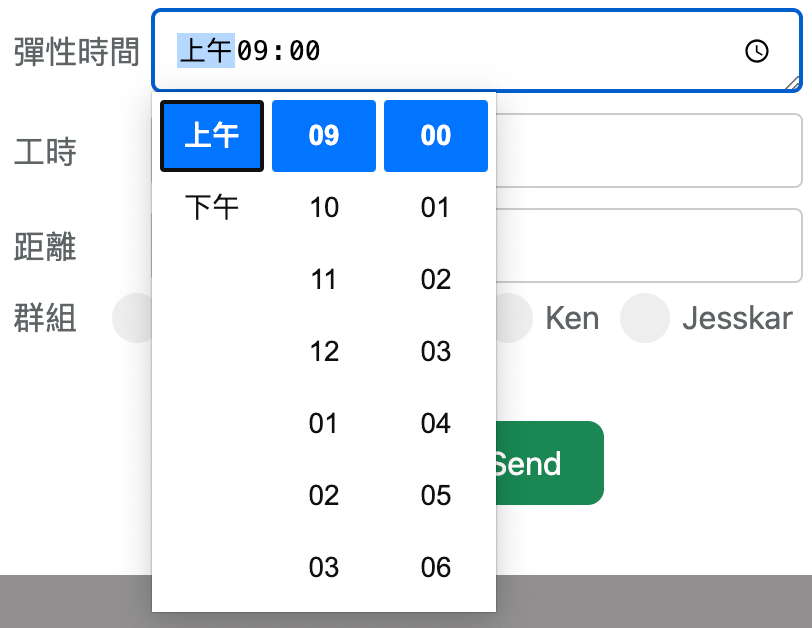
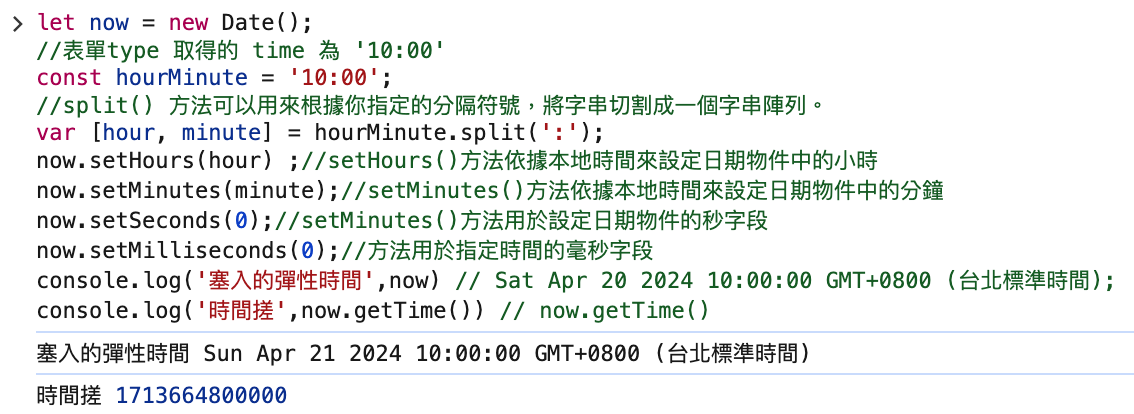
表單type 取得的 time 為 ‘10:00’這種格式如何改為時間搓,才能夠判斷遲到或是早退

邏輯:獲得現在時間 =>切割時間與分鐘 => 設定時間與分鐘 =>獲得的時間字符getTime()
1
2
3
4
5
6
7
8
9
10
11
let now = new Date();
//表單type 取得的 time 為 '10:00'
const hourMinute = '10:00';
//split() 方法可以用來根據你指定的分隔符號,將字串切割成一個字串陣列。
var [hour, minute] = hourMinute.split(':');
now.setHours(hour) ;//setHours()方法依據本地時間來設定日期物件中的小時
now.setMinutes(minute);//setMinutes()方法依據本地時間來設定日期物件中的分鐘
now.setSeconds(0);//setMinutes()方法用於設定日期物件的秒字段
now.setMilliseconds(0);//方法用於指定時間的毫秒字段
console.log('塞入的彈性時間',now) // Sat Apr 20 2024 10:00:00 GMT+0800 (台北標準時間);
console.log('時間搓',now.getTime()) // now.getTime()
參考資料 上班與下班打卡邏輯大致上是過濾當日的全部上班與下班,來判斷是否出現警告是否打過卡: 過濾當日上班正常或是上班遲到都必須顯示於畫面上
1
2
3
4
5
6
7
8
9
10
11
12
13
14
15
16
17
18
19
20
21
22
23
24
25
26
27
28
29
30
31
32
33
34
35
36
37
38
39
40
41
42
43
44
45
46
47
48
49
50
51
52
53
54
55
56
57
58
59
60
61
62
63
64
65
66
67
68
69
70
71
72
73
74
75
76
77
78
79
80
81
82
83
84
85
86
87
88
89
90
91
92
93
94
95
96
97
98
99
100
101
102
103
104
105
106
107
108
109
110
111
112
113
114
115
116
117
118
119
120
121
122
123
124
125
126
127
128
129
130
131
132
133
134
135
136
137
138
139
140
141
142
143
144
145
146
147
148
149
150
151
152
153
154
155
156
157
158
159
160
161
162
163
164
165
166
167
168
169
170
171
172
173
174
175
176
177
178
179
180
181
182
183
184
185
186
187
188
189
190
191
192
193
194
195
196
197
198
199
200
201
202
203
204
205
206
207
208
209
210
211
212
213
214
215
216
217
218
219
220
221
222
223
224
225
226
227
228
229
230
231
232
233
234
235
236
237
238
239
240
241
242
243
244
245
246
247
248
249
250
251
252
253
254
255
256
257
258
259
260
261
262
263
264
265
266
267
268
269
270
271
272
273
274
275
276
277
278
279
280
281
282
283
284
285
286
287
288
289
290
291
292
293
294
295
296
297
298
299
300
301
302
303
304
305
306
307
308
309
310
311
312
313
314
315
316
317
318
319
320
321
322
323
324
325
326
327
328
329
330
331
332
333
334
335
336
337
338
339
340
341
342
343
344
345
346
347
348
349
350
351
352
353
354
355
356
357
358
359
360
361
362
363
364
365
366
367
368
369
370
371
372
373
374
375
376
377
378
379
380
381
382
383
384
385
386
387
388
389
390
391
392
393
394
395
396
397
398
399
400
401
402
403
404
405
406
407
408
409
410
411
412
413
414
415
416
417
418
419
420
421
422
423
424
425
426
427
428
429
430
431
432
433
434
435
436
437
438
439
440
441
442
443
444
445
446
447
448
449
450
451
452
453
454
455
456
457
458
459
460
461
462
463
464
465
466
467
468
469
470
471
472
473
474
475
476
477
478
479
480
481
482
483
484
485
486
487
488
489
490
491
492
493
494
495
496
497
498
499
500
501
502
503
504
505
506
507
508
509
510
511
512
513
514
515
516
517
518
519
520
521
522
523
524
525
526
527
528
529
530
531
532
533
534
535
536
537
538
539
540
541
542
543
544
545
546
547
548
549
<script setup lang="ts">
import axios from "axios";
import {ref,onMounted} from 'vue';
import moment from 'moment';
import dayjs from 'dayjs'
const getToken =localStorage.getItem("token");
const headers = {"Authorization": 'Bearer '+getToken};
const pageName=ref<string>('出勤打卡');
interface menuType{
id:string,
title:string,
href:string,
}
const setCheckModesMainMenu=ref<menuType[]>([
{ id: 'setWorkCheckList', title: '出勤設定列表', href: '/admin/set_work_check' },
{ id: 'checkWorkCheck', title: '出勤打卡', href: '/admin/checkWorkCheck' },
{ id: 'checkWorkLists', title: '出勤列表', href: '/admin/checkWorkLists' },
{ id: 'checkCalendar', title: '出勤行事曆', href: '/admin/calendar' },
])
// 獲取 ip
const ip = ref<string>('');
const getIpClient = async () =>{
try {
const api='https://api.ipify.org?format=json';
const res = await axios.get(api);
if(res.status===200) {
ip.value = res.data.ip;
}
}
catch (error) {
console.error(error);
}
}

const isOnWorkMessage=ref<string>('');
const isOnBusinessWorkMessage = ref<string>('');
const isLate=ref<boolean>(true);
const borderColor=ref<string>('');
// 是否遲到
const isLateHow = (time:any) => {
const i=time;
console.log('i',i);
i > timeStamp.value ? isOnWorkMessage.value = '上班遲到' : isOnWorkMessage.value = '上班正常';
i > timeStamp.value ? isOnBusinessWorkMessage.value = '外勤上班遲到' : isOnBusinessWorkMessage.value = '外勤上班正常';
i > timeStamp.value ? isLate.value = true : isLate.value = false;
i > timeStamp.value ? borderColor.value = 'red' : borderColor.value = '#00bcd4';
}
interface checkWorkList{
_id:string,//id
workCheck_Id:number,//打卡id
userId:string,//使用者id
userName:string,//使用者名稱
title:string,//打卡名稱
start:string,//打卡時間
ip:string, // 打卡ip
onWorkStatus:boolean,//是否已上班
offWorkStatus:boolean,//是否已下班
borderColor:string, // 外框顏色
lat:string,//經度
lng:string,//緯度
}
const showOnWorkCheck=ref<boolean>(true);
const currentDayonWorkLists=ref<checkWorkList[]>([]);
const currentDayoffWorkLists=ref<checkWorkList[]>([]);
const currentDayonBusinessworkLists = ref<checkWorkList[]> ([]);
const currentDayoffBusinessworkLists= ref<checkWorkList[]> ([]);
const onWorkCheckTime=ref<string>('');
const offWorkCheckTime=ref<string>('');
const onBusinessWorkTime=ref<string>('');
const offBusinessWorkTime=ref<string>('');
let currentDay =dayjs(Date.now()).format('YYYY-MM-DD');
const getCurrentDayWork = async () => {
try{
const api=`${import.meta.env.VITE_API_URL}/auth/workChecks`;
const res = await axios.get(api,{ headers });
if(res.status===200){
//獲取當天上班打卡
currentDayonWorkLists.value = res.data.filter(function (item: any) {
if (
item.userName===localStorage.getItem('userName') &&
dayjs(item.start).format('YYYY-MM-DD').indexOf(currentDay) !== -1 && item.onWorkStatus && item.onWorkStatus != null
&& item.title === '上班正常'
||
item.userName===localStorage.getItem('userName') &&
dayjs(item.start).format('YYYY-MM-DD').indexOf(currentDay) !== -1 && item.onWorkStatus && item.onWorkStatus != null
&& item.title === '上班遲到'
) {
showOnWorkCheck.value = false;
onWorkCheckTime.value = dayjs(item.start).format('YYYY-MM-DD HH:mm:ss');
return item;
}
})
console.log('166',currentDayonWorkLists.value)
// 獲取當天下班打卡
currentDayoffWorkLists.value = res.data.filter(function (item: any) {
if (
item.userName===localStorage.getItem('userName') &&
dayjs(item.start).format('YYYY-MM-DD').indexOf(currentDay) !== -1 && item.offWorkStatus && item.offWorkStatus != null && item.title === '下班正常' ||
item.userName===localStorage.getItem('userName') &&
dayjs(item.start).format('YYYY-MM-DD').indexOf(currentDay) !== -1 && item.offWorkStatus && item.offWorkStatus != null && item.title === '下班早退'
) {
showOffWorkCheck.value = false;
offWorkCheckTime.value = dayjs(item.start).format('YYYY-MM-DD HH:mm:ss');
return item;
}
})
// 獲取當天外勤上班打卡
currentDayonBusinessworkLists.value = res.data.filter(function (item: any) {
if (
item.userName===localStorage.getItem('userName') &&
dayjs(item.start).format('YYYY-MM-DD').indexOf(currentDay) !== -1 && item.onWorkStatus && item.onWorkStatus != null && item.title === '外勤上班正常' ||
item.userName===localStorage.getItem('userName') &&
dayjs(item.start).format('YYYY-MM-DD').indexOf(currentDay) !== -1 && item.onWorkStatus && item.onWorkStatus != null && item.title === '外勤上班遲到'
) {
showOnBusinessWorkCheck.value = false;
onBusinessWorkTime.value = dayjs(item.start).format('YYYY-MM-DD HH:mm:ss')
return item;
}
})

// 外勤下班打卡列表
currentDayoffBusinessworkLists.value = res.data.filter(function (item: any) {
if (
item.userName===localStorage.getItem('userName') &&
dayjs(item.start).format('YYYY-MM-DD').indexOf(currentDay) !== -1 && item.offWorkStatus && item.offWorkStatus != null && item.title === '外勤下班正常' ||
item.userName===localStorage.getItem('userName') &&
dayjs(item.start).format('YYYY-MM-DD').indexOf(currentDay) !== -1 && item.offWorkStatus && item.offWorkStatus != null && item.title === '外勤下班早退'
) {
showOffBusinessWorkCheck.value = false;
offBusinessWorkTime.value = dayjs(item.start).format('YYYY-MM-DD HH:mm:ss')
return item;
}
})
}

}
catch(err){
console.log('err',err)
}
}
const currentDayAllOnWorkList =ref<checkWorkList[]>([]);
const currentDayAllOffWorkList =ref<checkWorkList[]>([])
// 獲取當日所有上班打卡列表(包含出勤上班與上班)=>必須加入判斷 是否是本人的數據
const getCurrentDayAllWork = async () => {
try {
const api = `${import.meta.env.VITE_API_URL}/auth/workChecks`;
const res = await axios.get(api,{ headers });
if (res.status === 200) {
// 獲取當日所有上班打卡列表
currentDayAllOnWorkList.value = res.data.filter(function (item: any) {
if (
item.userName===localStorage.getItem('userName') &&
dayjs(item.start).format('YYYY-MM-DD').indexOf(currentDay) !== -1 && item.onWorkStatus && item.title === '上班正常' ||
item.userName===localStorage.getItem('userName') &&
dayjs(item.start).format('YYYY-MM-DD').indexOf(currentDay) !== -1 && item.onWorkStatus && item.title === '上班遲到' ||
item.userName===localStorage.getItem('userName') &&
dayjs(item.start).format('YYYY-MM-DD').indexOf(currentDay) !== -1 && item.onWorkStatus && item.title === '外勤上班正常' ||
item.userName===localStorage.getItem('userName') &&
dayjs(item.start).format('YYYY-MM-DD').indexOf(currentDay) !== -1 && item.onWorkStatus && item.title === '外勤上班遲到'
) {
console.log('item',item)
return item;
}

})
console.log('獲取當日所有上班打卡列表', currentDayAllOnWorkList.value);
// 獲取當日所有下班列表
currentDayAllOffWorkList.value = res.data.filter(function (item: any) {
if (
item.userName===localStorage.getItem('userName') &&
dayjs(item.start).format('YYYY-MM-DD').indexOf(currentDay) !== -1 && item.offWorkStatus && item.title === '下班正常' ||
item.userName===localStorage.getItem('userName') &&
dayjs(item.start).format('YYYY-MM-DD').indexOf(currentDay) !== -1 && item.offWorkStatus && item.title === '下班早退' ||
item.userName===localStorage.getItem('userName') &&
dayjs(item.start).format('YYYY-MM-DD').indexOf(currentDay) !== -1 && item.offWorkStatus && item.title === '外勤下班正常' ||
item.userName===localStorage.getItem('userName') &&
dayjs(item.start).format('YYYY-MM-DD').indexOf(currentDay) !== -1 && item.offWorkStatus && item.title === '外勤下班早退'
) {
return item;
}
})
}
}
catch (err) {
console.error(err);
}
}

// 上班打卡
const checkOnWork = async () =>{
try {
if( currentDayAllOnWorkList.value.length>0 ){
alert('已經打過上班卡了')
}
else{
let time=Date.now();
isLateHow(time);
const api=`${import.meta.env.VITE_API_URL}/auth/workCheck`;
let query ={
workCheck_Id: Date.now(),
userId: localStorage.getItem('userId'),
userName: localStorage.getItem('userName'),
start: dayjs(Date.now()).format('YYYY-MM-DD HH:mm'),
onWorkStatus: true,
offWorkStatus: false,
title: isOnWorkMessage.value,
borderColor: borderColor.value,
ip: String(ip.value),
lat:latNow.value,
lng:lngNow.value,
}

console.log(query)
const res = await axios.post(api,query, { headers });

if(res.status===200){
alert('打卡成功!');
getCurrentDayWork();
getCurrentDayAllWork();
}
}
}
catch(err){
console.log('err',err)
}
}
const showOnBusinessWorkCheck =ref<boolean>(true);
// 外勤上班打卡
const checkOnBusinessWork = async () =>{
try {
if( currentDayAllOnWorkList.value.length>0 ){
alert('已經打過上班卡了')
}
else{
let time=Date.now();
isLateHow(time);
const api=`${import.meta.env.VITE_API_URL}/auth/workCheck`;
let query ={
workCheck_Id: Date.now(),
userId: localStorage.getItem('userId'),
userName: localStorage.getItem('userName'),
start: dayjs(Date.now()).format('YYYY-MM-DDTHH:mm'),
onWorkStatus: true,
offWorkStatus: false,
title: isOnBusinessWorkMessage.value,
borderColor: borderColor.value,
ip: String(ip.value),
lat:latNow.value,
lng:lngNow.value,
}

console.log(query)
const res = await axios.post(api,query, { headers });

if(res.status===200){
showOnBusinessWorkCheck.value = false;
alert('打卡成功!');
getCurrentDayWork();
getCurrentDayAllWork();
}
}
}
catch(err){
console.log('err',err)
}
}
// 是否早退
const isOffWorkMessage=ref<string>('');
const isOffBusinessWorkMessage=ref<string>('');
const isLeaveEarly=ref<boolean>(true);
const isLeaveEarlyHow = (time:any) => {
const i=time;
i < endTimeStamp.value ? isOffWorkMessage.value = '下班早退' : isOffWorkMessage.value = '下班正常';
i < endTimeStamp.value ? isOffBusinessWorkMessage.value = '外勤下班早退' : isOffBusinessWorkMessage.value = '外勤下班正常';
i < endTimeStamp.value ? isLeaveEarly.value = true : isLeaveEarly.value = false;
i < endTimeStamp.value ? borderColor.value = 'red' : borderColor.value = '#00bcd4';
}
const showOffWorkCheck =ref<boolean>(true);
// 下班打卡
const checkOffWork =async()=>{
try {
if( currentDayAllOffWorkList.value.length>0){
alert('已經打過下班卡了')
}
else{
let time=Date.now();
isLeaveEarlyHow(time);
const api=`${import.meta.env.VITE_API_URL}/auth/workCheck`;
let query ={
workCheck_Id: Date.now(),
userId: localStorage.getItem('userId'),
userName: localStorage.getItem('userName'),
start: dayjs(Date.now()).format('YYYY-MM-DDTHH:mm'),
onWorkStatus: true,
offWorkStatus: true,
title: isOffWorkMessage.value,
borderColor: borderColor.value,
ip: String(ip.value),
lat:latNow.value,
lng:lngNow.value,
}
console.log(query)
const res = await axios.post(api,query, { headers });

if(res.status===200){
showOffWorkCheck.value = false;
getCurrentDayWork();
getCurrentDayAllWork();
alert('打卡成功!');
}
}
}
catch(err){
console.log('err',err)
}
}
const showOffBusinessWorkCheck =ref<boolean>(true);
//外勤下班打卡
const checkOffBusinessWork =async()=>{
try {
if( currentDayAllOffWorkList.value.length>0){
alert('已經打過下班卡了')
}
else{
let time=Date.now();
isLeaveEarlyHow(time);
const api=`${import.meta.env.VITE_API_URL}/auth/workCheck`;
let query ={
workCheck_Id: Date.now(),
userId: localStorage.getItem('userId'),
userName: localStorage.getItem('userName'),
start: dayjs(Date.now()).format('YYYY-MM-DDTHH:mm'),
onWorkStatus: true,
offWorkStatus: true,
title: isOffBusinessWorkMessage.value,
borderColor: borderColor.value,
ip: String(ip.value),
lat:latNow.value,
lng:lngNow.value,
}
console.log(query)
const res = await axios.post(api,query, { headers });

if(res.status===200){
showOffBusinessWorkCheck.value = false;
getCurrentDayWork();
getCurrentDayAllWork();
alert('打卡成功!');
}
}
}
catch(err){
console.log(err)
}
}
//
const getUsers = async () =>{
try {
const api=`${import.meta.env.VITE_API_URL}/auth/users`;
let query ={
workCheck_Id:Date.now(),
userId:localStorage.getItem('userId'),
userName:localStorage.getItem('userName'),
start:Date.now(),
onWorkStatus:true,
title:'上班打卡',
borderColor:'red',
ip: String(ip.value),
lat:latNow.value,
lng:lngNow.value,
}
const res = await axios.post(api,query, { headers });
if(res.status===200){

}
}
catch (error) {
console.error(error);
}
}

// 算出圓周
const radius =(p: number) =>{
return p * Math.PI / 180.0;
}
// 計算距離,參數分別爲第一點的緯度,經度;第二點的緯度,經度
const getDistance =(lat1: number,lng1: number,lat2: number,lng2: number) =>{
const radLat1 = radius(lat1);
const radLat2 = radius(lat2);
// 緯度距離
const a = radLat1 - radLat2;
const b = radius(lng1) - radius(lng2);
let s = 2 * Math.asin(Math.sqrt(Math.pow(Math.sin(a/2),2) +
Math.cos(radLat1)*Math.cos(radLat2)*Math.pow(Math.sin(b/2),2)));

s = s * 6378.137 ;// 地球半徑;
s = Math.round(s * 10000) / 10000; //單位為 km
return s;
}
// 定位
const showMap=ref<boolean>(false);
const getMap=ref<string>('');
const lat = ref<string>('');
const lng = ref<string>('');
const latNow = ref<number| null>(null);
const lngNow = ref<number | null>(null);
// 圓周距離
const distance =ref<number>(500);
const location =() =>{
if ("geolocation" in navigator) {
try {
setTimeout(() =>{
// 獲取當前位置
navigator.geolocation.getCurrentPosition((position) => {
// 解構方式獲取
const { latitude, longitude } = position.coords;
latNow.value=latitude;
lngNow.value=longitude;
if(setMap.value.length===0){
alert('定位不成功!');
}else{
// b單位為 km
let dis = getDistance(Number(lat.value) ,Number(lng.value),latitude,longitude);
// 距離公尺
let removing =dis * 100;
// 距離公尺<圓周距離限制
if(removing<distance.value){
showMap.value=true;
}else{
alert('你不在打卡範圍內,請檢查定位設定並重新登入!')
}
}
})
}, 5000)
}
catch (error:any) {
switch(error.code){
case error.PERMISSION_DENIED: alert('使用者拒絕了地理定位請求。');
break;
case error.POSITION_UNAVAILABLE: alert('位置資訊不可用。');
break;
case error.TIMEOUT:alert("取得用戶位置的請求逾時。");
break;
case error.UNKNOWN_ERROR:alert("出現未知錯誤。");
break;
}
}
}else{
alert("Sorry, 你的裝置不支援地理位置功能。")
}
}
interface checkSetingListType {
_id:string,
mode:number,//模式
name:string,//地點
url:string,//地圖
flexibleTime:string,//彈性上班
flexibleHour:string,//工時
distance:number,//圓周
lat:string,//經度
lng:string,//緯度
personGroup:Object,//群組
buildDate:number,
updataDate:number,
}
const checkSetingList=ref<checkSetingListType[]>([]);
const flexibleTime=ref<number | any >(null);
const setMap=ref<string>('');
const office=ref<string>('');
const flexibleHour =ref<string>('');
// 獲得出勤設定
const getSetMode = async() =>{
try {
const api=`${import.meta.env.VITE_API_URL}/auth/setCheckModes`;
const res = await axios.get(api, { headers });
if (res.status === 200) {
setTimeout(() =>{
checkSetingList.value=res.data.filter((element:any)=>{
if(element.name==='台中大墩11街'){
return element
}else if (element.name!='台中大墩11街'){
return element
}
})
console.log('台中辦公室',checkSetingList.value);
lat.value=checkSetingList.value[0].lat;
lng.value=checkSetingList.value[0].lng;
flexibleTime.value=checkSetingList.value[0].flexibleTime;
setMap.value=checkSetingList.value[0].url;
console.log(setMap.value)
distance.value=checkSetingList.value[0].distance;
office.value=checkSetingList.value[0].name;
flexibleHour.value=checkSetingList.value[0].flexibleHour;
// 將彈性時間改為時間搓
formatFlexibleTime(flexibleTime.value);
}, 3000)
location()
}
}
catch(err){
console.log('err',err)
}
}

const changeFlexibleTime =ref<any>('');
const timeStamp=ref<any>(null);
const endTimeStamp=ref<any>(null);//下班的時間搓
// 將彈性時間改為時間搓 塞入timeStamp 1.獲取flexibleTime
const formatFlexibleTime =(flexibleTime:any) =>{
let now = new Date();
// 原生時間表單表單type 取得的 time 為 '10:00'
const hourMinute = flexibleTime;
//split() 方法可以用來根據你指定的分隔符號,將字串切割成一個字串陣列。
var [hour, minute] = hourMinute.split(':');
// 設定日期的小時、分鐘、秒和毫秒
now.setHours(hour) ;//setHours()方法依據本地時間來設定日期物件中的小時
now.setMinutes(minute);//setMinutes()方法依據本地時間來設定日期物件中的分鐘
now.setSeconds(0);//setMinutes()方法用於設定日期物件的秒字段
now.setMilliseconds(0);//方法用於指定時間的毫秒字段
changeFlexibleTime.value = now;
// console.log('changeFlexibleTime',changeFlexibleTime.value);
// Sat Apr 20 2024 10:00:00 GMT+0800 (台北標準時間);
const changeFormat =dayjs(changeFlexibleTime.value).format('YYYY-MM-DD HH:mm:ss');
console.log('changeFormat',changeFormat);
timeStamp.value=now.getTime()//
console.log('timeStamp.value',timeStamp.value);
//算出下班時間
if(changeFormat!=''){
const endTmeFormat =dayjs(changeFormat).add(Number(flexibleHour.value), 'hours').format('YYYY-MM-DD HH:mm:ss');
console.log('下班時間',endTmeFormat);
const endTime=dayjs(endTmeFormat,'YYYY-MM-DD HH:mm:ss');
// console.log('endTime',endTime);
endTimeStamp.value=endTime.valueOf();
console.log('endTimeStamp.value',endTimeStamp.value);
}
// console.log('changeFormat',changeFormat);
const time = dayjs(changeFormat,'YYYY-MM-DD HH:mm:ss');
//**valueOf() 方法傳回字串的原始值。
timeStamp.value=time.valueOf();
//console.log('timeStamp.value',timeStamp.value);
}
onMounted(()=>{
getSetMode(); // 出勤設定
getIpClient();
getCurrentDayWork();
getCurrentDayAllWork();

})
</script>

json-server 模擬Api

json-server db.json

1
2
3
4
5
// 安裝
npm install --save json-server
// json-server版本號
json-server -v

1
2
3
4
5
6
7
8
9
10
11
12
13
14
15
let fruits = [
{item: 'apple', quantity: 0},
{item: 'banana', quantity: 1},
{item: 'cherry', quantity: 2}
]
// 這面這行就是告訴電腦我想要怎麼過濾
let fruitsNew = fruits.filter(e => e.quantity > 0)
console.log(fruitsNew)
/*
印出:
[
{ item: 'banana', quantity: 1 },
{ item: 'cherry', quantity: 2 }
]
*/

// 過濾重複元素

1
2
3
4
5
6
var array=["a", 1, 2, 3, 2, 3, "b", "a"]; 
var result=array.filter(function(element, index, arr){
return arr.indexOf(element) === index; });
console.log(result);
// ["a", 1, 2, 3, "b"];

Vite出勤行事曆

Fullcalendar官網Vue3

安裝fullcalendar/vue3@6.1.10

1
2
npm install @fullcalendar/vue3@6.1.10
npm install --save @fullcalendar/core@6.1.10 @fullcalendar/daygrid@6.1.10 @fullcalendar/interaction@6.1.10 @fullcalendar/timegrid@6.1.10 @fullcalendar/list@6.1.10

模糊搜尋

定義checkWorkDataCalendarSearch, 利用vue input 表單雙向綁定 v-model=”checkWorkDataCalendarSearch”
引入computed
邏輯:
定義一個object就是獲得的陣列=>
如果 雙向綁定的 搜尋input(checkWorkDataCalendarSearch.value)沒有值,return 定義的這個object
=>否則 filter 如果 title indexOf !=-1 (=-1就是沒有找到) return 過濾的 item; 否則 return 定義的這個object

1
2
3
4
5
6
7
8
9
10
11
12
13
14
15
const filterCheckWorkDataCalendar = computed(() =>{
let postList_array = scheduleCalendarLists.value;
console.log('scheduleCalendarLists.value',scheduleCalendarLists.value)
if(checkWorkDataCalendarSearch.value === '') {
return postList_array;
}
checkWorkDataCalendarSearch.value = checkWorkDataCalendarSearch.value.trim().toLowerCase();
postList_array = postList_array.filter(function (opt) {
if ( opt.title.toLowerCase().indexOf(checkWorkDataCalendarSearch.value) !== -1 )
{
return opt;
}
})
return postList_array;
});

完整程式碼

1
2
3
4
5
6
7
8
9
10
11
12
13
14
15
16
17
18
19
20
21
22
23
24
25
26
27
28
29
30
31
32
33
34
35
36
37
38
39
40
41
42
43
44
45
46
47
48
49
50
51
52
53
54
55
56
57
58
59
60
61
62
63
64
65
66
67
68
69
70
71
72
73
74
75
76
77
78
79
80
81
82
83
84
85
86
87
88
89
90
91
92
93
94
95
96
97
98
99
100
101
102
103
104
105
106
107
108
109
110
111
112
113
114
115
116
117
118
119
120
121
122
123
124
125
126
127
128
129
130
131
132
133
134
135
136
137
138
139
140
141
142
143
144
145
146
147
148
149
150
151
152
153
154
155
156
157
158
159
160
161
162
163
164
165
166
167
168
169
170
<template>
<ul class="set_work_check">
<li v-for="(item,id) in setCheckModesMainMenu" :key="id">
<router-link
:to="item.href"
:class="{activePage: item.title===pageName}"> {{item.title}}</router-link>
</li>
</ul>
<div class="checkCalendar">
<!--搜尋-->
<div class="checkWorkData_means">
<div class="btns_group">

<!---模糊搜尋 綁定-->
<input v-model="checkWorkDataCalendarSearch"
placeholder="search" />
<i class="icon-ym icon-ym-search"></i>

</div>
</div>
<FullCalendar :options="calendarOptions"></FullCalendar>
</div>
</template>

<route lang="yaml">
meta:
layout: LayoutBack
requireAutd: true
</route>

<script setup lang="ts">
import axios from "axios";
import {ref,onMounted,computed} from 'vue';
import FullCalendar from '@fullcalendar/vue3';
import { CalendarOptions , EventClickArg } from '@fullcalendar/core';
import dayGridPlugin from '@fullcalendar/daygrid';
import interactionPlugin from '@fullcalendar/interaction';
import timeGridPlugin from '@fullcalendar/timegrid';
import listPlugin from '@fullcalendar/list';
const getToken =localStorage.getItem("token");
const headers = {"Authorization": 'Bearer '+getToken};
const pageName=ref<string>('出勤行事曆');
interface menuType{
id:string,
title:string,
href:string,
}
const setCheckModesMainMenu=ref<menuType[]>([
{ id: 'setWorkCheckList', title: '出勤設定列表', href: '/admin/set_work_check' },
{ id: 'checkWorkCheck', title: '出勤打卡', href: '/admin/checkWorkCheck' },
{ id: 'checkWorkLists', title: '出勤列表', href: '/admin/checkWorkLists' },
{ id: 'checkCalendar', title: '出勤行事曆', href: '/admin/calendar' },
])
const checkWorkDataCalendarSearch =ref<string>('');
interface workCheckType{
_id:string,
workCheck_Id:string,
userId:string,
userName: string,
start: string,
onWorkStatus: true,
offWorkStatus: false,
title: string,
borderColor: string,
ip: string,
lat: number,
lng: number,
}
const scheduleCalendarLists=ref<workCheckType[]>([]);

//獲取數據
const getCalendar = async () => {
try{
const api=`${import.meta.env.VITE_API_URL}/auth/workChecks`;
const res = await axios.get(api,{ headers });
if(res.status===200){
/*重點 res.data.reverse()*/
if(localStorage.getItem('userName')==='user'){
scheduleCalendarLists.value = res.data;
calendarOptions.value.events=filterCheckWorkDataCalendar;
}else{
scheduleCalendarLists.value = res.data.filter(function (item: workCheckType) {
console.log(item,item.userName,item.userName===localStorage.getItem('userName'))
if (item.userName===localStorage.getItem('userName')){
return item;
}
});
calendarOptions.value.events=filterCheckWorkDataCalendar;
}


}
}
catch(err){
console.log(err)
}
};
//模糊搜尋
const filterCheckWorkDataCalendar = computed(() =>{
let postList_array = scheduleCalendarLists.value;
console.log('scheduleCalendarLists.value',scheduleCalendarLists.value)
if(checkWorkDataCalendarSearch.value === '') {
return postList_array;
}
checkWorkDataCalendarSearch.value = checkWorkDataCalendarSearch.value.trim().toLowerCase();
postList_array = postList_array.filter(function (opt) {
if ( opt.title.toLowerCase().indexOf(checkWorkDataCalendarSearch.value) !== -1 )
{
return opt;
}
})
return postList_array;
});
interface headerToolbarType{
left:string,
center:string,
right:string,
}
// web headerToolbar顯示方式
const webDisableHeaderToolbar=ref<headerToolbarType>({
left: 'prev',
center: 'title,dayGridMonth,timeGridWeek,timeGridDay',
right: 'next'
})
// mobile headerToolbar顯示方式
const mobileDisableHeaderToolbar=ref<headerToolbarType>({
left: 'prev',
center: 'title,dayGridMonth,listWeek,timeGridDay',
right: 'next'
})
//
const calendarOptions = ref<CalendarOptions>({
timeZone: 'Asia/Taipei',
locale:'zh-TW',
plugins: [dayGridPlugin, interactionPlugin, timeGridPlugin,listPlugin],
headerToolbar:window.screen.width < 767?mobileDisableHeaderToolbar:webDisableHeaderToolbar ,
//螢幕尺寸767以下顯示
initialView: window.screen.width < 767 ? 'listWeek' : 'dayGridMonth',
//高度設置
height: window.screen.width < 767 ? 800 : 800,
//*****初始化,新增事件初始化改為空值陣列,
// initialEvents: scheduleCalendarList.value,
events: [],
//時間設置
eventTimeFormat: {
hour: '2-digit',
minute: '2-digit',
hour12: false
},
//刪除事件
// eventClick: openDeleteEvent,
//新增事件
// select: addSchedule,
editable: false,//允許拖拉縮放
droppable: true, //允許將事情放到日曆上
selectable: true, //允許選擇
selectMirror: true,//允許選擇鏡像
dayMaxEvents: true,//允許一天最多事件時就顯示彈出窗口
weekends: true,//顯示週末
//eventsSet:handleEvents,
// drop: dropEvents;
// 更新遠程數據庫
// eventAdd:
// eventChange:
// eventRemove:
});
onMounted(()=>{
getCalendar();
})
</script>

js定位與範圍內 & Vue語法糖寫法 定位與使用套件

取得使用者定位

參考資料
Geolocation地理位置地理座標
通過調用navigator.geolocation對象來訪問Geolocation API,授予設備訪問權

  1. getCurrentPosition:返回設備當前位置
  2. watchPosition:設備位置改變時自動調用處裡的函式
  • success 回調(必需)
  • error 回調(可選)
  • options 對象(可選)
1
2
3
4
5
6
7
8
9
10
11
12
13
14
15
16
17
18
19
20
21
22
23
24
25
26
27
navigator.geolocation.getCurrentPosition(success[, error[, options]])

//js取得裝置是否同意被取得所在位置座標
if ("geolocation" in navigator) {
try {
navigator.geolocation.getCurrentPosition((position) => {
//success
const { latitude, longitude } = position.coords;
})
}
catch (error: any) {
//success
switch (error.code) {
case error.PERMISSION_DENIED: alert("使用者拒絕了地理定位請求。");
break;
case error.POSITION_UNAVAILABLE: alert("位置資訊不可用。");
break;
case error.TIMEOUT: alert("取得用戶位置的請求逾時。");
break;
case error.UNKNOWN_ERROR: alert("出現未知錯誤。");
break;
}
}
} else {
alert("Sorry, 你的裝置不支援地理位置功能。")
/* geolocation IS NOT available */
}

指定定位範圍內函式(Math.PI圓周直徑的比例)

Math.PI=3.14159

1
2
3
4
5
6
7
8
9
//js
function radius(d){
return d * Math.PI / 180.0;
}
//Vue setup ts 語法
const radius = (p: number) => {
return p * Math.PI / 180.0;
}

參考資料

計算距離函式

Math.asin() 方法返回一個數值的反正弦(單位為弧度)
Math.sqrt() 方法返回一個數值的平方根
Math.pow() 返回基數(base)指數
Math.cos() 返回一個數值的餘弦值
Math.round() 函數回傳四捨五入後的近似值
toFixed() 方法會使用定點小數表示法(fixed-point notation)來格式化數字。

1
2
3
4
5
6
7
8
9
10
11
12
13
14
15
16
17
18
19
20
21
22
23
24
25
26
27
28
//js
function getDistance(lat1,lng1,lat2,lng2){
var radLat1 = radius(lat1);
var radLat2 = radius(lat2);
var a = radLat1 - radLat2;
var b = radius(lng1) - radius(lng2);
var s = 2 * Math.asin(Math.sqrt(Math.pow(Math.sin(a/2),2) +
Math.cos(radLat1)*Math.cos(radLat2)*Math.pow(Math.sin(b/2),2)));
s = s *6378.137 ;// EARTH_RADIUS;
s = Math.round(s * 10000) / 10000; //輸出爲公里
//s=s.toFixed(4);
return s;
}

//Vue setup ts 語法
//參數分別爲第一點的緯度,經度;第二點的緯度,經度
const getDistance = (lat1: number, lng1: number, lat2: number, lng2: number) => {
const radLat1 = radius(lat1);
const radLat2 = radius(lat2);
//緯度距離
const a = radLat1 - radLat2;
const b = radius(lng1) - radius(lng2);
let s = 2 * Math.asin(Math.sqrt(Math.pow(Math.sin(a / 2), 2) +
Math.cos(radLat1) * Math.cos(radLat2) * Math.pow(Math.sin(b / 2), 2)));
s = s * 6378.137;// 地球半徑;
s = Math.round(s * 10000) / 10000; //輸出爲公里
return s;
}
參考資料

Vue 語法糖寫法使用

安裝vue-google-maps-ui套件

Vue Google Maps UI

1
2
3
4
5
6
7
8
9
10
npm install vue-google-maps-ui --save 或 
yarn add vue-google-maps-ui 或
pnpm add vue-google-maps-ui --save
載入方法
//全局載入 main.ts
import GoogleMap from 'vue-google-maps-ui'
app.use(GoogleMap)
//頁面載入
import GoogleMap from 'vue-google-maps-ui'

Vue setup ts 寫法
1
2
3
4
5
6
7
8
9
10
11
12
13
14
15
16
17
18
19
20
21
22
23
24
25
26
27
28
29
30
31
32
33
34
35
36
37
38
39
40
41
42
43
44
45
46
47
48
49
50
51
52
53
54
55
56
57
58
59
60
61
62
63
64
65
66
67
68
69
70
71
72
73
74
75
76
77
78
79
80
81
82
83
84
85
86
87
88
89
90
91
92
93
94
95
96
97
98
99
100
101
102
103
104
105
106
107
108
109
110
111
112
113
114
115
116
117
118
119
120
121
122
123
124
125
126
127
128
129
130
131
132
133
134
135
136
137
138
139
140
141
142
143
144
145
146
147
148
149
150
151
152
153
154
155
156
157
158
159
160
161
162
163
164
165
166
167
168
169
170
171
172
173
174
175
176
177
178
179
180
181
182
183
184
185
186
187
188
189
<template>
<GoogleMap class="map"
:api-key="googleMapKey"
:drawingManagerOptions="{ isSingle: true }"
:zoom="25"
width="100%"
height="100vh"

:options='{ fullscreenControl: false, mapTypeControl: false }'
language="zh-Tw"
:current-address="{
geometry: {
location: { lat: lat, lng: lng }
},
formatted_address: addresss
}"
/>
</template>


<script setup lang="ts">
import { ref, onMounted } from 'vue';
import GoogleMap from 'vue-google-maps-ui';
//googleMapKey金鑰寫在環境變數
const googleMapKey = ref<any>(`${import.meta.env.VITE_GOOGLE_MAPS_KEY}`);
const lat = ref<number>(24.1487354);
const lng = ref<number>(120.6544864);
const addresss = ref<string>('');
//算出圓周
const radius = (p: number) => {
console.log('算出圓周',p * Math.PI / 180.0)//2.1058120410500933
return p * Math.PI / 180.0;
}
//計算距離,參數分別爲第一點的緯度,經度;第二點的緯度,經度
const getDistance = (lat1: number, lng1: number, lat2: number, lng2: number) => {
const radLat1 = radius(lat1);
const radLat2 = radius(lat2);
//緯度距離
const a = radLat1 - radLat2;
const b = radius(lng1) - radius(lng2);
let s = 2 * Math.asin(Math.sqrt(Math.pow(Math.sin(a / 2), 2) +
Math.cos(radLat1) * Math.cos(radLat2) * Math.pow(Math.sin(b / 2), 2)));


s = s * 6378.137;// 地球半徑;
s = Math.round(s * 10000) / 10000; //單位為 km
return s;
}
//定位
const position = () => {
if ("geolocation" in navigator) {
try {
setTimeout(() =>{
// 獲取當前位置
navigator.geolocation.getCurrentPosition((position) => {
// 解構方式獲取
const { latitude, longitude } = position.coords;
latNow.value=latitude;
lngNow.value=longitude;
if(setMap.value.length===0){
alert('定位不成功!');
}
else{
// b單位為 km
let dis = getDistance(Number(lat.value) ,Number(lng.value),latitude,longitude);
// 距離公尺
let removing =dis * 100;
// 距離公尺<圓周距離限制
if(removing<distance.value){
showMap.value=true;
}
else{
alert('你不在打卡範圍內,請檢查定位設定並重新登入!')
}
}
})
}, 5000)
}
catch (error: any) {
//success
switch (error.code) {
case error.PERMISSION_DENIED: alert("使用者拒絕了地理定位請求。");
break;
case error.POSITION_UNAVAILABLE: alert("位置資訊不可用。");
break;
case error.TIMEOUT: alert("取得用戶位置的請求逾時。");
break;
case error.UNKNOWN_ERROR: alert("出現未知錯誤。");
break;
}
}
} else {
alert("Sorry, 你的裝置不支援地理位置功能。")
/* geolocation IS NOT available */
}
interface checkSetingListType {
_id:string,
mode:number,//模式
name:string,//地點
url:string,//地圖
flexibleTime:string,//彈性上班
flexibleHour:string,//工時
distance:number,//圓周
lat:string,//經度
lng:string,//緯度
personGroup:Object,//群組
buildDate:number,
updataDate:number,
}
const checkSetingList=ref<checkSetingListType[]>([]);
const flexibleTime=ref<number | any >(null);
const setMap=ref<string>('');
const office=ref<string>('');
const flexibleHour =ref<string>('');
// 獲得出勤設定
const getSetMode = async() =>{
try {
const api=`${import.meta.env.VITE_API_URL}/auth/setCheckModes`;
const res = await axios.get(api, { headers });
if (res.status === 200) {
setTimeout(() =>{
checkSetingList.value=res.data.filter((element:any)=>{
if(element.name==='台中大墩11街'){
return element
}else if (element.name!='台中大墩11街'){
return element
}
})
console.log('台中辦公室',checkSetingList.value);
lat.value=checkSetingList.value[0].lat;
lng.value=checkSetingList.value[0].lng;
flexibleTime.value=checkSetingList.value[0].flexibleTime;
setMap.value=checkSetingList.value[0].url;
console.log(setMap.value)
distance.value=checkSetingList.value[0].distance;
office.value=checkSetingList.value[0].name;
flexibleHour.value=checkSetingList.value[0].flexibleHour;
// 將彈性時間改為時間搓
formatFlexibleTime(flexibleTime.value);
}, 3000)
position()
}
}
catch(err){
console.log('err',err)
}
}

const changeFlexibleTime =ref<any>('');
const timeStamp=ref<any>(null);
const endTimeStamp=ref<any>(null);//下班的時間搓
// 將彈性時間改為時間搓 塞入timeStamp 1.獲取flexibleTime
const formatFlexibleTime =(flexibleTime:any) =>{
let now = new Date();
// 原生時間表單表單type 取得的 time 為 '10:00'
const hourMinute = flexibleTime;
//split() 方法可以用來根據你指定的分隔符號,將字串切割成一個字串陣列。
var [hour, minute] = hourMinute.split(':');
// 設定日期的小時、分鐘、秒和毫秒
now.setHours(hour) ;//setHours()方法依據本地時間來設定日期物件中的小時
now.setMinutes(minute);//setMinutes()方法依據本地時間來設定日期物件中的分鐘
now.setSeconds(0);//setMinutes()方法用於設定日期物件的秒字段
now.setMilliseconds(0);//方法用於指定時間的毫秒字段
changeFlexibleTime.value = now;
// console.log('changeFlexibleTime',changeFlexibleTime.value);
// Sat Apr 20 2024 10:00:00 GMT+0800 (台北標準時間);
const changeFormat =dayjs(changeFlexibleTime.value).format('YYYY-MM-DD HH:mm:ss');
console.log('changeFormat',changeFormat);
timeStamp.value=now.getTime()//
console.log('timeStamp.value',timeStamp.value);
//算出下班時間
if(changeFormat!=''){
const endTmeFormat =dayjs(changeFormat).add(Number(flexibleHour.value), 'hours').format('YYYY-MM-DD HH:mm:ss');
console.log('下班時間',endTmeFormat);
const endTime=dayjs(endTmeFormat,'YYYY-MM-DD HH:mm:ss');
// console.log('endTime',endTime);
endTimeStamp.value=endTime.valueOf();
console.log('endTimeStamp.value',endTimeStamp.value);
}
// console.log('changeFormat',changeFormat);
const time = dayjs(changeFormat,'YYYY-MM-DD HH:mm:ss');
//**valueOf() 方法傳回字串的原始值。
timeStamp.value=time.valueOf();
//console.log('timeStamp.value',timeStamp.value);
}
};
onMounted( () => {
getSetMode(); // 出勤設定
});
定位不準確的問題

Vite 分頁邏輯與搜尋功能(語法糖)

// 註解A:在迭代物件屬性時,使用 for…in 迭代物件屬性 參考

  • A搜尋功能: 綁定搜尋表單,使用computed(計算功能)如果搜尋表單沒有值=>返回獲取到的陣列;如果有那就搜尋表單去除空白與大小寫 indexOf !==-1,返回它 並返回陣列
    filter() js 過濾功能 filter() js
    indexOf 找出元素索引值的陣列 indexOf js
  • B分頁總數:過濾的總筆數除以每頁筆數,「無條件進位」=>Math.ceil():公式:Math.ceil(過濾的總筆÷每頁筆數)
    Math.ceil 無條件進位 javaScript 浮點數計算
  • C分頁項目
    1.計算出每一頁的第一個索引數(使用computed(計算功能))=>當前頁面乘以每一頁減去每一頁=>最少都會在第一頁
    2.返回 => 搜尋後(過濾後)=>arr.slice([begin[, end]])回傳一個新陣列物件
    slice() js 給予開始或是結束索引,回傳一個新陣列物件 參閱slice() js
  • 選擇每頁顯示幾筆數據 v-model="pageValue" 綁定表單 ,函式 => @change="changeItemsPerPage($event)"

以下是程式碼

1
2
3
4
5
6
7
8
9
10
11
12
13
14
15
16
17
18
19
20
21
22
23
24
25
26
27
28
29
30
31
32
33
34
35
36
37
38
39
40
41
42
43
44
45
46
47
48
49
50
51
52
53
54
55
56
57
58
59
60
61
62
63
64
65
66
67
68
69
70
71
72
73
74
75
76
77
78
79
80
81
82
83
84
85
86
87
88
89
90
91
92
93
94
95
96
97
98
99
100
101
102
103
104
105
106
107
108
109
110
111
112
113
114
115
116
117
118
119
120
121
122
123
124
125
126
127
128
129
130
131
132
133
134
135
136
137
138
139
140
141
142
143
144
145
146
147
148
149
150
151
152
153
154
155
156
157
158
159
160
161
162
163
164
165
166
167
168
169
170
171
172
173
174
175
176
177
178
179
180
181
182
183
184
<template>
<div class="checkWork_area">
<div class="search_bar_group">
<button class="el-button el-button--primary"> 導出Excel</button>
<!--綁定input v-model="searchQuery"-->
<input class="el-input__inner"
v-model="searchQuery" placeholder="search"/>
<i class="icon-search"></i>
</div>
<!----table-->
<div class="check_table_area">
<tr>
<th v-for="(item,thid) in tableHeader" :key="thid">
{{item.subject}}
</th>
</tr>
<tbody>
<!--過濾以後才開始分頁排列-->
<tr v-for="(item,index) in paginatedItems" :key="index">
<td>{{ Number(index+1 + startIndexValue) }}</td>
<td>{{ item.title }}</td>
<td>{{item.sourceWebName}}</td>
<td>{{ item.startDate}}</td>
</tr>
</tbody>
</div>

<!--*分頁-->
<ul class="pagination">
<!--如果在第一頁時 上一頁就是disabled-->
<li :class="{ 'disabled': currentPage === 1 }" >
<a @click="prevPage">
<i class="icon-chevron-left-solid"></i>
</a>
</li>
<!--總頁數遍歷 =>如果當頁的點擊的 page就是active -->
<li v-for="(n,index ) in totalPages" :key="index" @click="itActive(n)"
:class="{ 'active': n === currentPage }" >
<a>{{ n }}</a>
</li>
<!--如果在當前頁面等於總頁數就是disabled-->
<li
:class="{ 'disabled': currentPage === totalPages }" >
<a @click="nextPage">
<i class="icon-chevron-right-solid"></i></a>
</li>
<li>共{{ paginatedItems.length }}筆</li>
<li>
<el-select
v-model="pageValue"
class="m-2"
placeholder="Select"
style="width: 240px"
@change="changeItemsPerPage($event)"
>
<el-option
v-for="item in pagePerOptions"
:key="item.value"
:label="item.label"
:value="item.value"
/>
</el-select>
</li>
</ul>
</div>
</template>

<script setup lang="ts">
import axios from 'axios';
import { ref, onMounted, computed } from 'vue';
// 搜尋表單綁定
const searchQuery = ref<string>('');
// 當前頁面
const currentPage = ref<number>(1);
// 每頁幾筆
const itemsPerPage = ref<number>(10);
//選擇每頁顯示幾筆
const changeItemsPerPage = (event: number) => {
itemsPerPage.value = event;
}
const pagePerOptions = [
{ value: '10', label: '10筆' },
{ value: '15', label: '15筆' },
{ value: '20', label: '20筆' },
{ value: '30', label: '30筆' },
{ value: '40', label: '40筆' },
{ value: '50', label: '50筆' },
]
const pageValue = ref<string>('10筆');
interface tableHeaderType {
subject?: string;
thid?: string;
}
const tableHeader = ref<tableHeaderType[]>([
{ subject: '項目', thid: 'item' },
{ subject: '主題', thid: 'title' },
{ subject: '來源', thid: 'orange' },
{ subject: '開始時間', thid: 'startTime' }
])
// listType屬性
interface listsType {
UID?: string;
version?: string;
category?: string;
comment?: string;
descriptionFilterHtml?: string;
discountInfo?: string;
editModifyDate?: string;
hitRate?: number;
imageUrl?: string;
masterUnit?: object;
title?: string | any;
sourceWebName?: string | any;
startDate?: string | any;
}
// 表格數據
const lists = ref<listsType[]>([]);
// A搜尋功能過濾:綁定搜尋表單,使用computed(計算功能)如果搜尋表單沒有值=>返回獲取到的陣列;如果有那就搜尋表單去除空白與大小寫 indexOf !==-1,返回它 並返回陣列
const filteredItems = computed(() => {
let filteredItems = lists.value;
if (searchQuery.value === '') {
return filteredItems;
}
searchQuery.value = searchQuery.value.trim().toLowerCase();
filteredItems = filteredItems.filter(function (opt: listsType) {
// indexOf !==-1 =>
if (opt.title.toLowerCase().indexOf(searchQuery.value) !== -1 || opt.sourceWebName.toLowerCase().indexOf(searchQuery.value) !== -1) {
return opt;
}
})
return filteredItems;
})
// 索引數字
const startIndexValue = ref<number>(1);

// 總頁數
const totalPages = computed(() => {
// B分頁總數=>過濾的總筆數除以每頁筆數,「無條件進位」=>Math.ceil():公式:Math.ceil(過濾的總筆÷每頁筆數)
return Math.ceil(filteredItems.value.length / itemsPerPage.value);
})
// 分頁項目
const paginatedItems = computed(() => {
// 當前頁面乘以每一頁減去每一頁
const startIndex = currentPage.value * itemsPerPage.value - itemsPerPage.value;
startIndexValue.value = startIndex;
// 返回 => 搜尋後(過濾後)=>arr.slice([begin[, end]])回傳一個新陣列物件
return filteredItems.value.slice(startIndex, startIndex + itemsPerPage.value);
})
// 上一頁
const prevPage = () => {
// 如果當前頁面小於 < 1
if (currentPage.value > 1) {
currentPage.value--;
}
}
// 下一頁
const nextPage = () => {
// 如果當前頁面小於 < 全部頁面 =。那當前頁就能++
if (currentPage.value < totalPages.value) {
currentPage.value++;
}
}
// 點擊獲得第幾頁塞入當前頁面
const itActive = (page: number) => {
// 如果當前頁面是null那當前頁面是第一頁,否則是點擊頁面
page === null ? currentPage.value = 1 : currentPage.value = page;
}
// 獲取數據
const getItems = async () => {
try {
const api = 'https://cloud.culture.tw/frontsite/trans/SearchShowAction.do?method=doFindTypeJ&category=200';
const res = await axios.get(api);
lists.value = res.data;
}
catch (err) {
console.log('err', err);
}
}
onMounted(() => {
getItems();
console.log(typeof pagePerOptions)
})
</script>

github 分頁邏輯說明

父傳子到子分頁

組件
v-model 的參數語法不會直接修改 props 的值 , 修改=>使用父組件 pageValue 父傳給子,@update:pageValue=”pageValue = $event”, 當 Pagination 组件觸發 update:pageValue 事件時,子組件会觸發 update:pageValue 的自定義事件,並將新值作為参数傳遞給父組件

父組件
引入Pagination.vue 子組件

<Pagination
:currentPage=”currentPage”
:totalPages=”totalPages”
:totoItem=”filteredItems.length”
:pagePerOptions=”pagePerOptions”
:pageValue=”pageValue”
@update:pageValue=”pageValue = $event”
@sendprevPage=”prevPage”
@sendNextPage=”nextPage”
@sendItActive=”itActive”
@sendOnChange=”changeItemsPerPage”
/>
傳值與接收子組件的通訊

1
2
3
4
5
6
7
8
9
10
11
12
13
14
15
16
17
18
19
20
21
22
23
24
25
26
27
28
29
30
31
32
33
34
35
36
37
38
39
40
41
42
43
44
45
46
47
48
49
50
51
52
53
54
55
56
57
58
59
60
61
62
63
64
65
66
67
68
69
70
71
72
73
74
75
76
77
78
79
80
81
82
83
84
85
86
87
88
89
90
91
92
93
94
95
96
97
98
99
100
101
102
103
104
105
106
107
108
109
110
111
112
113
114
115
116
117
118
119
120
121
122
123
124
125
126
127
128
129
130
131
132
133
134
135
136
137
138
139
140
141
142
143
144
145
146
147
148
149
150
151
152
153
154
155
156
157
158
159
160
161
<template>
<div class="checkWork_area">
<div class="search_bar_group">
<button class="el-button el-button--primary"> 導出Excel</button>
<!--綁定input v-model="searchQuery"-->
<input class="el-input__inner"
v-model="searchQuery" placeholder="search"/>
<i class="icon-search"></i>
</div>
<!----table-->
<div class="check_table_area">
<tr>
<th v-for="(item,thid) in tableHeader" :key="thid">
{{item.subject}}
</th>
</tr>
<tbody>
<!--過濾以後才開始分頁排列-->
<tr v-for="(item,index) in paginatedItems" :key="index">
<td>{{ Number(index+1 + startIndexValue) }}</td>
<td>{{ item.title }}</td>
<td>{{item.sourceWebName}}</td>
<td>{{ item.startDate}}</td>

</tr>
</tbody>
</div>

<!--子組件Pagination -->
<Pagination
:currentPage="currentPage"
:totalPages="totalPages"
:totoItem="filteredItems.length"
:pagePerOptions="pagePerOptions"
:pageValue="pageValue"
@update:pageValue="pageValue = $event"
@sendprevPage="prevPage"
@sendNextPage="nextPage"
@sendItActive="itActive"
@sendOnChange="changeItemsPerPage"
/>
</div>
</template>

<script setup lang="ts">
import axios from 'axios';
import { ref, onMounted, computed } from 'vue';
import Pagination from '../components/Pagination.vue';
// 搜尋表單綁定
const searchQuery = ref<string>('');
// 當前頁面
const currentPage = ref<number>(1);
// 每頁幾筆
const itemsPerPage = ref<number>(10);
const changeItemsPerPage = (event: number) => {
itemsPerPage.value = event;
}
const pagePerOptions = [
{ value: '10', label: '10筆' },
{ value: '15', label: '15筆' },
{ value: '20', label: '20筆' },
{ value: '30', label: '30筆' },
{ value: '40', label: '40筆' },
{ value: '50', label: '50筆' },
]
const pageValue = ref<string>('10筆');
interface tableHeaderType {
subject?: string;
thid?: string;
}
const tableHeader = ref<tableHeaderType[]>([
{ subject: '項目', thid: 'item' },
{ subject: '主題', thid: 'title' },
{ subject: '來源', thid: 'orange' },
{ subject: '開始時間', thid: 'startTime' }
])
// listType屬性
interface listsType {
UID?: string;
version?: string;
category?: string;
comment?: string;
descriptionFilterHtml?: string;
discountInfo?: string;
editModifyDate?: string;
hitRate?: number;
imageUrl?: string;
masterUnit?: object;
title?: string | any;
sourceWebName?: string | any;
startDate?: string | any;
}
// 表格數據
const lists = ref<listsType[]>([]);
// A搜尋功能過濾:綁定搜尋表單,使用computed(計算功能)如果搜尋表單沒有值=>返回獲取到的陣列;如果有那就搜尋表單去除空白與大小寫 indexOf !==-1,返回它 並返回陣列
const filteredItems = computed(() => {
let filteredItems = lists.value;
if (searchQuery.value === '') {
return filteredItems;
}
searchQuery.value = searchQuery.value.trim().toLowerCase();
filteredItems = filteredItems.filter(function (opt: listsType) {
// indexOf !==-1 =>
if (opt.title.toLowerCase().indexOf(searchQuery.value) !== -1 || opt.sourceWebName.toLowerCase().indexOf(searchQuery.value) !== -1) {
return opt;
}
})
return filteredItems;
})
// 索引數字
const startIndexValue = ref<number>(1);

// 總頁數
const totalPages = computed(() => {
// B分頁總數=>過濾的總筆數除以每頁筆數,「無條件進位」=>Math.ceil():公式:Math.ceil(過濾的總筆÷每頁筆數)
return Math.ceil(filteredItems.value.length / itemsPerPage.value);
})
// 分頁項目
const paginatedItems = computed(() => {
// 當前頁面乘以每一頁減去每一頁
const startIndex = currentPage.value * itemsPerPage.value - itemsPerPage.value;
startIndexValue.value = startIndex;
// 返回 => 搜尋後(過濾後)=>arr.slice([begin[, end]])回傳一個新陣列物件
return filteredItems.value.slice(startIndex, startIndex + itemsPerPage.value);
})
// 上一頁
const prevPage = () => {
// 如果當前頁面小於 < 1
if (currentPage.value > 1) {
currentPage.value--;
}
}
// 下一頁
const nextPage = () => {
// 如果當前頁面小於 < 全部頁面 =。那當前頁就能++
if (currentPage.value < totalPages.value) {
currentPage.value++;
}
}
// 點擊獲得第幾頁塞入當前頁面
const itActive = (page: number) => {
// 如果當前頁面是null那當前頁面是第一頁,否則是點擊頁面
page === null ? currentPage.value = 1 : currentPage.value = page;
}
// 獲取數據
const getItems = async () => {
try {
const api = 'https://cloud.culture.tw/frontsite/trans/SearchShowAction.do?method=doFindTypeJ&category=200';
const res = await axios.get(api);
lists.value = res.data;
}
catch (err) {
console.log('err', err);
}
}
onMounted(() => {
getItems();
console.log(typeof pagePerOptions)
})
</script>

分頁的父傳子

新增Pagination.vue 子組件
使用=>import { defineProps } from ‘vue’;
// prop 接收物件設定type
const props = defineProps({
currentPage: { type: Number },
totalPages: { type: Number },
totoItem: { type: Number },
pagePerOptions: Object,
pageValue: { type: String },
})
// 父對子傳值
const emits = defineEmits([‘sendprevPage’, ‘sendNextPage’, ‘sendItActive’, ‘sendOnChange’]);
const sendprevPage = () => {
emits(‘sendprevPage’,)
}
const sendNextPage = () => {
emits(‘sendNextPage’,)
}
const sendItActive = (page: number) => {
emits(‘sendItActive’, page)
}
const sendOnChange = (event: number) => {
emits(‘sendOnChange’, event)
}

子組件=>Pagination.vue
1
2
3
4
5
6
7
8
9
10
11
12
13
14
15
16
17
18
19
20
21
22
23
24
25
26
27
28
29
30
31
32
33
34
35
36
37
38
39
40
41
42
43
44
45
46
47
48
49
50
51
52
53
54
55
56
<template>
<ul class="pagination">
<li :disabled="currentPage === 1">
<a @click="sendprevPage"><i class="icon-chevron-left-solid"></i></a>
</li>
<li v-for="(n, index ) in totalPages" :key="index" @click="sendItActive(n)"
:class="{ 'active': n === currentPage }">
<a> {{ n }}</a>
</li>
<li :disabled="currentPage === totalPages">
<a @click="sendNextPage">
<i class="icon-chevron-right-solid"></i>
</a>
</li>
<li>共{{ totoItem }}筆</li>
<li>
<el-select
:model-value="pageValue"
@update:model-value="$emit('update:pageValue', $event)"
class="m-2"
placeholder="Select"
style="width: 240px"
@change="sendOnChange($event)">
<el-option v-for="item in pagePerOptions" :key="item.value" :label="item.label" :value="item.value" />
</el-select>
</li>
</ul>
</template>

<script setup lang="ts">
import { ref } from 'vue'
import { defineProps } from 'vue'
const props = defineProps({
currentPage: { type: Number },
totalPages: { type: Number },
totoItem: { type: Number },
pagePerOptions: Object,
pageValue: { type: String },

})


const emits = defineEmits(['sendprevPage', 'sendNextPage', 'sendItActive', 'sendOnChange']);
const sendprevPage = () => {
emits('sendprevPage',)
}
const sendNextPage = () => {
emits('sendNextPage',)
}
const sendItActive = (page: number) => {
emits('sendItActive', page)
}
const sendOnChange = (event: number) => {
emits('sendOnChange', event)
}
</script>
github 分頁邏輯,分頁可選每頁頁數與搜尋功能,父子間的通訊 父子間的通訊

GitHub 說明

1
2
3
4
5
6
7
8
9
10
11
12
13
14
15
16
17
18
19
20
21
22
23
24
25
26
27
28
29
30
31
32
33
34
35
36
37
38
39
40
41
42
43
44
45
46
47
48
<style lang="scss" scoped>
.active {
a {
color: red;
border-bottom:2px solid #3333;
}
}
.pagination{
display: flex;
justify-content: center;
list-style-type:none;
> li {
margin: auto 10px;
list-style-type:none;
a{
background-color: #b0cbfb;
border: 2px solid #3f51b5;
border-radius: 9999rem;
color:#3f51b5;
display: block;
height: 30px;
line-height: 30px;
text-align: center;
width: 30px;
&:hover{
background-color: #3f51b5;
border: 2px solid #3f51b5;
color:#ffff;
}
}
&.disabled{
color:#ddd;
cursor: not-allowed;
a{
background-color: #dddddd;
border: 2px solid #b0cbfb;
border-radius: 9999rem;
color:#c9c2c2;
display: block;
height: 30px;
line-height: 30px;
text-align: center;
width: 30px;
}
}
}
}
</style>

VueCli Event Bus

創建bus.js文件

新增utils資料夾,新增 bus.js
bus.js內容如下
引入Vue導出EventBus

1
2
import Vue from "vue";
export const EventBus = new Vue();

1.傳送:在發送組件的組件調用$emit發送數據的方法

import { EventBus } from “../utils/bus.js”
EventBus.$emit(‘定義一個名字’, 參數2:’要發送的數據’)

2.接收:數據的組件中調用$on方法監聽mounted

import { EventBus } from “../utils/bus.js”

// 接收數據
EventBus.$on(‘定義一個名字’, 參數2:’(value)=>{
// value是接收的數據
this.message=value;
}’)

3.銷毀監聽

beforeDestroy() {
// 銷毁監聽
EventBus.$off(“clickSendMsg”);
EventBus.$off(“clickToMsg”);
},

VueCli 安裝 jquery

VueCli 安裝 jquery

執行指令

1
2
npm install jquery --save

在build/webpack.base.conf文件當中引入jquery

1
2
3
4
5
6
7
8
9
10
11
12
13
14
module.exports = {
...
resolve: {
extensions: ['.js', '.vue', '.json'],
alias: {
'vue$': 'vue/dist/vue.esm.js',
'@': resolve('src'),
// 引入jquery
'jquery': path.resolve(__dirname, '../node_modules/jquery/src/jquery')
}
},
...
}