Angular Router CanActivate路由導航守衛

app資料夾新增 @guard 資料夾內新增 auth.guard.ts檔案中新增以下設定:
  • 引入 Injectableimport { Injectable } from '@angular/core';
  • 引入 ActivatedRouteSnapshot, CanActivate, Router, RouterStateSnapshot, UrlTreeimport { ActivatedRouteSnapshot, CanActivate, Router, RouterStateSnapshot, UrlTree } from '@angular/router';
  • 引入 Observable import { Observable } from 'rxjs';
  • class AuthGuard implements CanActivate 內
    constructor(private router: Router) { }
    canActivate( localStorage.getItem('token') 有登入並且沒有過期的jwt,沒有時,導到登入頁面 )
1
2
3
4
5
6
7
8
9
10
11
12
13
14
15
16
17
18
19
20
21
22
23
24
25
26
27
28
29
30
31
32
33
34
35
36
37
import { Injectable } from '@angular/core';
import { ActivatedRouteSnapshot, CanActivate, Router, RouterStateSnapshot, UrlTree } from '@angular/router';
import { Observable } from 'rxjs';

//裝飾器
@Injectable({
providedIn: 'root'
})

export class AuthGuard implements CanActivate {

constructor(private router: Router) { }

canActivate(
route: ActivatedRouteSnapshot,
state: RouterStateSnapshot): Observable<boolean | UrlTree> | Promise<boolean | UrlTree> | boolean | UrlTree {

const jwt = localStorage.getItem('token');
if (jwt) {
const payload = JSON.parse(window.atob(jwt.split('.')[1]));
const exp = new Date(Number(payload.exp) * 1000);
if (new Date() > exp) {
alert('JWT已過期,請重新登入');
return this.router.createUrlTree(['/login']);
}
} else {
alert('尚未登入');
return this.router.createUrlTree(['/login']);
}
return true;
}

canActivateChild(childRoute: ActivatedRouteSnapshot, state: RouterStateSnapshot): boolean | UrlTree | Observable<boolean | UrlTree> | Promise<boolean | UrlTree> {
return this.canActivate(childRoute, state);
}

}

Angular ng-bootstrap 分頁搜尋排序

Table Sort Serarh Pagination

Ng-bootstrap安裝參考

屬性
檔案名稱:country.ts
1
2
3
4
5
6
7
8
//country.ts
export interface Country {
id: number;
name: string;
flag: string;
area: number;
population: number;
}
陣列資料數據
檔案名稱:countries.ts
1
2
3
4
5
6
7
8
9
10
11
12
13
14
15
16
17
18
19
20
21
22
23
24
25
26
27
28
29
30
31
32
33
34
35
36
37
38
39
40
41
42
43
44
45
46
47
48
49
50
51
52
53
54
55
56
57
58
59
60
61
62
63
64
65
66
67
68
69
70
71
72
73
74
75
76
77
78
79
80
81
82
83
84
85
86
87
88
89
90
91
92
93
94
95
96
97
//countries.ts
import { Country } from './country';

export const COUNTRIES: Country[] = [
{
id: 1,
name: 'Russia',
flag: 'f/f3/Flag_of_Russia.svg',
area: 17075200,
population: 146989754,
},
{
id: 2,
name: 'France',
flag: 'c/c3/Flag_of_France.svg',
area: 640679,
population: 64979548,
},
{
id: 3,
name: 'Germany',
flag: 'b/ba/Flag_of_Germany.svg',
area: 357114,
population: 82114224,
},
{
id: 4,
name: 'Portugal',
flag: '5/5c/Flag_of_Portugal.svg',
area: 92090,
population: 10329506,
},
{
id: 5,
name: 'Canada',
flag: 'c/cf/Flag_of_Canada.svg',
area: 9976140,
population: 36624199,
},
{
id: 6,
name: 'Vietnam',
flag: '2/21/Flag_of_Vietnam.svg',
area: 331212,
population: 95540800,
},
{
id: 7,
name: 'Brazil',
flag: '0/05/Flag_of_Brazil.svg',
area: 8515767,
population: 209288278,
},
{
id: 8,
name: 'Mexico',
flag: 'f/fc/Flag_of_Mexico.svg',
area: 1964375,
population: 129163276,
},
{
id: 9,
name: 'United States',
flag: 'a/a4/Flag_of_the_United_States.svg',
area: 9629091,
population: 324459463,
},
{
id: 10,
name: 'India',
flag: '4/41/Flag_of_India.svg',
area: 3287263,
population: 1324171354,
},
{
id: 11,
name: 'Indonesia',
flag: '9/9f/Flag_of_Indonesia.svg',
area: 1910931,
population: 263991379,
},
{
id: 12,
name: 'Tuvalu',
flag: '3/38/Flag_of_Tuvalu.svg',
area: 26,
population: 11097,
},
{
id: 13,
name: 'China',
flag: 'f/fa/Flag_of_the_People%27s_Republic_of_China.svg',
area: 9596960,
population: 1409517397,
},
];

country.service.ts
1
2
3
4
5
6
7
8
9
10
11
12
13
14
15
16
17
18
19
20
21
22
23
24
25
26
27
28
29
30
31
32
33
34
35
36
37
38
39
40
41
42
43
44
45
46
47
48
49
50
51
52
53
54
55
56
57
58
59
60
61
62
63
64
65
66
67
68
69
70
71
72
73
74
75
76
77
78
79
80
81
82
83
84
85
86
87
88
89
90
91
92
93
94
95
96
97
98
99
100
101
102
103
104
105
106
107
108
109
110
111
112
113
114
115
116
117
118
119
120
121
122
123
124
125
126
127
128
129
130
131
132
133
134
135
/* eslint-disable @typescript-eslint/adjacent-overload-signatures */
import { Injectable, PipeTransform } from '@angular/core';
//https://ithelp.ithome.com.tw/m/articles/10223920
import { BehaviorSubject, Observable, of, Subject } from 'rxjs';

import { Country } from './country'; //數據屬性
import { COUNTRIES } from './countries';//陣列資料數據
import { DecimalPipe } from '@angular/common';
import { debounceTime, delay, switchMap, tap } from 'rxjs/operators';
import { SortColumn, SortDirection } from './sortable.directive';

//搜尋結果屬性
interface SearchResult {
countries: Country[];
total: number;
}

interface State {
page: number;
pageSize: number;
searchTerm: string;
sortColumn: SortColumn;
sortDirection: SortDirection;
}
// 比較
const compare = (v1: string | number, v2: string | number) => (v1 < v2 ? -1 : v1 > v2 ? 1 : 0);
// 排序:城市,行,描述
function sort(countries: Country[], column: SortColumn, direction: string): Country[] {
if (direction === '' || column === '') {
return countries;
} else {
return [...countries].sort((a, b) => {
const res = compare(a[column], b[column]);
return direction === 'asc' ? res : -res;
});
}
}
匹配
function matches(country: Country, term: string, pipe: PipeTransform) {
return (
country.name.toLowerCase().includes(term.toLowerCase()) ||
pipe.transform(country.area).includes(term) ||
pipe.transform(country.population).includes(term)
);
}

@Injectable({ providedIn: 'root' })
export class CountryService {
private _loading$ = new BehaviorSubject<boolean>(true);
private _search$ = new Subject<void>();
private _countries$ = new BehaviorSubject<Country[]>([]);
private _total$ = new BehaviorSubject<number>(0);

private _state: State = {
page: 1,
pageSize: 4,
searchTerm: '',
sortColumn: '',
sortDirection: '',
};
// 建構函數
//DecimalPipe 小數點. 把數字轉換成字串, 根據本地化規則進行格式化,這些規則會決定分組大小和分組分隔符、小數點字元以及其它與本地化環境有關的配置項。
constructor(private pipe: DecimalPipe) {
this._search$
.pipe(
tap(() => this._loading$.next(true)),
debounceTime(200),
switchMap(() => this._search()),
delay(200),
tap(() => this._loading$.next(false)),
)
.subscribe((result) => {
this._countries$.next(result.countries);
this._total$.next(result.total);
});

this._search$.next();
}

get countries$() {
return this._countries$.asObservable();
}
get total$() {
return this._total$.asObservable();
}
get loading$() {
return this._loading$.asObservable();
}
get page() {
return this._state.page;
}
get pageSize() {
return this._state.pageSize;
}
get searchTerm() {
return this._state.searchTerm;
}

set page(page: number) {
this._set({ page });
}
set pageSize(pageSize: number) {
this._set({ pageSize });
}
set searchTerm(searchTerm: string) {
this._set({ searchTerm });
}
set sortColumn(sortColumn: SortColumn) {
this._set({ sortColumn });
}
set sortDirection(sortDirection: SortDirection) {
this._set({ sortDirection });
}

private _set(patch: Partial<State>) {
Object.assign(this._state, patch);
this._search$.next();
}

private _search(): Observable<SearchResult> {
const { sortColumn, sortDirection, pageSize, page, searchTerm } = this._state;

// 1. sort
let countries = sort(COUNTRIES, sortColumn, sortDirection);

// 2. filter
countries = countries.filter((country) => matches(country, searchTerm, this.pipe));
const total = countries.length;

// 3. paginate
countries = countries.slice((page - 1) * pageSize, (page - 1) * pageSize + pageSize);
return of({ countries, total });
}
}

排序
sortable.directive.ts
1
2
3
4
5
6
7
8
9
10
11
12
13
14
15
16
17
18
19
20
21
22
23
24
25
26
27
28
29
30
31
32
33
34
35
36
// sortable.directive.ts
import { Directive, EventEmitter, Input, Output } from '@angular/core';
import { Country } from './country';

export type SortColumn = keyof Country | '';
export type SortDirection = 'asc' | 'desc' | '';
const rotate: { [key: string]: SortDirection } = { asc: 'desc', desc: '', '': 'asc' };

export interface SortEvent {
column: SortColumn;
direction: SortDirection;
}

@Directive({
selector: 'th[sortable]',
standalone: true,
host: {
'[class.asc]': 'direction === "asc"',
'[class.desc]': 'direction === "desc"',
'(click)': 'rotate()',
},
})
// 可排序標頭
export class NgbdSortableHeader {
//接收父元件
@Input() sortable: SortColumn = '';
@Input() direction: SortDirection = '';

@Output() sort = new EventEmitter<SortEvent>();

rotate() {
this.direction = rotate[this.direction];
this.sort.emit({ column: this.sortable, direction: this.direction });
}
}

users.component.ts
1
2
3
4
5
6
7
8
9
10
11
12
13
14
15
16
17
18
19
20
21
22
23
24
25
26
27
28
29
30
31
32
33
34
35
36
37
38
39
40
41
42
43
44
45
46
47
48
49
50
51
52
53
54
// users.component.ts
import { AsyncPipe, DecimalPipe, NgFor, NgIf } from '@angular/common';
import { Component, QueryList, ViewChildren } from '@angular/core';
import { Observable } from 'rxjs';
import { Country } from './country';//屬性
import { CountryService } from './country.service';
import { NgbdSortableHeader, SortEvent } from './sortable.directive';
import { FormsModule } from '@angular/forms';
import { NgbHighlight, NgbPaginationModule ,NgbDropdownConfig, NgbDropdownModule} from '@ng-bootstrap/ng-bootstrap';

@Component({
selector: 'app-users',
standalone: true,
imports: [ NgIf, NgFor,DecimalPipe, FormsModule, AsyncPipe, NgbHighlight, NgbdSortableHeader, NgbPaginationModule,NgbDropdownModule],
templateUrl: './users.component.html',
styleUrl: './users.component.scss',
providers: [CountryService, DecimalPipe,NgbDropdownConfig],
})

export class UsersComponent {
countries$: Observable<Country[]>;
total$: Observable<number>;

@ViewChildren(NgbdSortableHeader) headers: QueryList<NgbdSortableHeader> | undefined;

constructor(public service: CountryService) {
this.countries$ = service.countries$;
this.total$ = service.total$;
}

onSort({ column, direction }: SortEvent) {
// this.headers.forEach((header) => {
// if (header.sortable !== column) {
// header.direction = '';
// }
// });

this.service.sortColumn = column;
this.service.sortDirection = direction;
}
pagePerOptions = [
{ value: 5, label: '5筆' },
{ value: 10, label: '10筆' },
{ value: 15, label: '15筆' },
{ value: 20, label: '20筆' },
{ value: 30, label: '30筆' },
{ value: 40, label: '40筆' },
{ value: 50, label: '50筆' },
]
changeItemsPerPage(item: any) {
this.service.pageSize = item.value;
}
}

Table,Sort,Search,Pagination Html
1
2
3
4
5
6
7
8
9
10
11
12
13
14
15
16
17
18
19
20
21
22
23
24
25
26
27
28
29
30
31
32
33
34
35
36
37
38
39
40
41
42
43
44
45
46
47
48
49
50
51
52
53
54
55
56
57
58
59
60
61
62
63
64
65
66
67
68
69
70
71
72
73
74
75
76
77
78
79
80
81
82
83
84
85
86
87
88
89
90
91
92
93
94
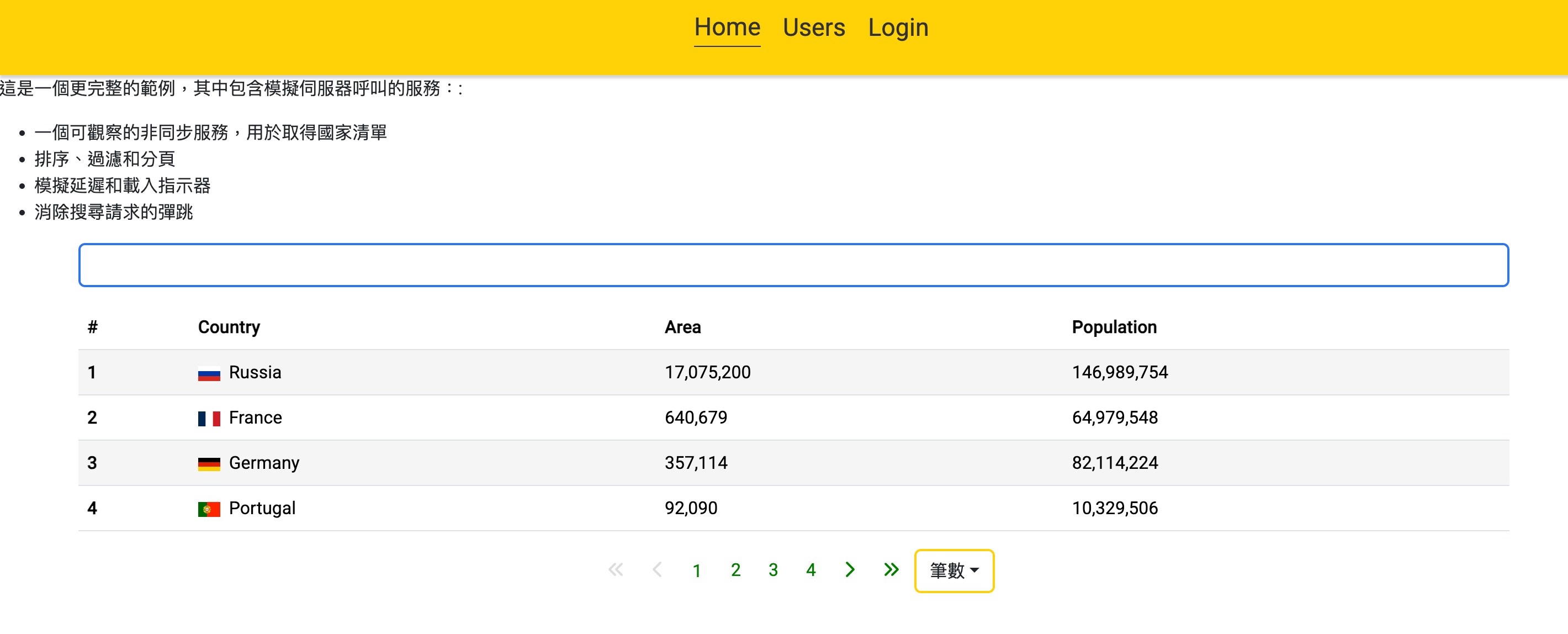
<p>這是一個更完整的範例,其中包含模擬伺服器呼叫的服務::</p>

<ul>
<li>一個可觀察的非同步服務,用於取得國家清單</li>
<li>排序、過濾和分頁</li>
<li>模擬延遲和載入指示器</li>
<li>消除搜尋請求的彈跳</li>
</ul>
<div class="container">
<form>
<div class="mb-3 row">
<div class="col">
<input
id="table-complete-search"
type="text"
class="form-control"
name="searchTerm"
[(ngModel)]="service.searchTerm"
/>
</div>

<span *ngIf="service.loading$ | async" class="col col-form-label">Loading...</span>

</div>
<table class="table table-striped default_table">
<thead>
<tr>
<th scope="col">#</th>
<th scope="col" sortable="name" (sort)="onSort($event)">Country</th>
<th scope="col" sortable="area" (sort)="onSort($event)">Area</th>
<th scope="col" sortable="population" (sort)="onSort($event)">Population</th>
</tr>
</thead>
<tbody>
<!-- //@for (country of countries$ | async; track country.id) { -->

<tr *ngFor="let country of countries$ | async">
<th scope="row">{{ country.id }}</th>
<td>
<img
[src]="'https://upload.wikimedia.org/wikipedia/commons/' + country.flag"
[alt]="'The flag of ' + country.name"
class="me-2"
style="width: 20px"
/>
<ngb-highlight [result]="country.name" [term]="service.searchTerm" />
</td>
<td><ngb-highlight [result]="country.area | number" [term]="service.searchTerm" /></td>
<td><ngb-highlight [result]="country.population | number" [term]="service.searchTerm" /></td>
</tr>
<!-- } @empty {
<tr>
<td colspan="4" style="text-align: center">No countries found</td>
</tr>
} -->
</tbody>
</table>

<div class="d-flex justify-content-center ng_pagination_area mt-3">
<!---分頁-->
<ngb-pagination
[collectionSize]="(total$ | async)!"
[(page)]="service.page"
[maxSize]="5"
[rotate]="true"
[ellipses]="false"
[boundaryLinks]="true"
[pageSize]="service.pageSize"
>
<ng-template ngbPaginationFirst>
<i class="fa-solid fa-angles-left"></i>
</ng-template>
<ng-template ngbPaginationPrevious>
<i class="fa-solid fa-chevron-left"></i>
</ng-template>
<ng-template ngbPaginationNext>
<i class="fa-solid fa-chevron-right"></i>
</ng-template>
<ng-template ngbPaginationLast>
<i class="fa-solid fa-angles-right"></i>
</ng-template>
</ngb-pagination>

<div ngbDropdown>
<button type="button" class="btn" id="dropdownConfig" ngbDropdownToggle>筆數</button>
<div ngbDropdownMenu aria-labelledby="dropdownConfig">
<button ngbDropdownItem
*ngFor="let item of pagePerOptions"
(click)="changeItemsPerPage(item)">{{item.label}}</button>
</div>
</div>
</div>
</form>
</div>
樣式
1
2
3
4
5
6
7
8
9
10
11
12
13
14
15
16
17
18
19
20
21
22
23
24
25
26
27
28
29
30
31
32
33
34
35
36
37
38
39
40
41
42
43
44
45
46
47
48
49
50
51
52
53
54
55
56
57
58
59
60
61
62
63
64
65
66
67
68
69
70
71
72
73
74
75
76
77
78
79
80
81
82
83
84
85
86
87
88
89
90
91
92
93
94
95
96
97
98
99
100
101
102
103
104
105
106
107
108
109
110
111
112
113
114
115
116
117
118
119
120
121
122
123
124
125
126
127
128
129
130
131
132
133
134
135
136
//table
.default_table{
margin: auto;
.row{
width: 100%;
max-width: 100%;
}
}
.form-control{
width: 100%;
max-width: 100%;
border:2px solid rgb(44, 120, 235);
:focus {
color: var(--bs-body-color);
background-color: var(--bs-body-bg);
border-color: rgb(134, 182.5, 254);
outline: 0;
box-shadow: 0 0 0 0.25rem rgba(13, 110, 253, 0.25);
}
}
// 分頁Pagination
.page-link:focus {
background-color: transparent;
box-shadow: inset 1px -1px 0 0.25rem transparent;
}
a:-webkit-any-link:focus-visible {
outline-offset: 0px;
}
a:hover {
--bs-link-color-rgb: transparent;
}
:focus-visible {
outline: white auto 0px;
}
.ng_pagination_area {
.pagination{
li {
&:first-child a {
span {
display: none;
}
}
}
.active > {
.page-link{
color:green;
background-color: transparent;
border-radius: 50%;
border: 2px solid green;
&:hover,&:focus{
background-color: transparent;
}
}
}
.page-item{
.page-link{
color:green;
border-color: transparent;
background-color: transparent;
&:hover,&:focus{
background-color: transparent;
border: 0px solid transparent;
}
}
&.disabled{
.page-link{
color:#ddd;
}
}
&:not( :first-child,:last-child,:nth-child(2),:nth-last-child(2) ){
.page-link{
&:hover,&:focus{
background-color: transparent;
border-radius: 50%;
border: 2px solid green;
}
}
}
&:not(:first-child){ color:red; }
}
}
}
/*下拉元件*/
.btn{
border:2px solid #ffd207;
&:hover,&:focus{
background-color: #ffd207;
color:#333;
}
}
.dropup{
margin-left: 10px;
.dropdown-toggle{
border-color:#ffd207;
color:#333;
}
.btn{
border:1px solid #ffd207;
--bs-btn-padding-x: 0.75rem;
--bs-btn-padding-y: 0.175rem;
&:hover,&:focus{
background-color: #ffd207;
color:#333;
}
}
.dropdown-menu{
min-width: 50px;
&.show {
min-width: 50px
}
.dropdown-item{
&.active,
&:active{
background-color: #ffd207;
color:#333;
}
}
}
}
.dropdown-menu{
min-width: 50px;
&.show {
min-width: 50px
}
}
.btn-check:checked + .btn,
:not(.btn-check) +
.btn:active,
.btn:first-child:active,
.btn.active,
.btn.show {
color:#333;
background-color:#ffd207;
border-color: #ffd207;
}

Github 範例

Angular 表單驗證

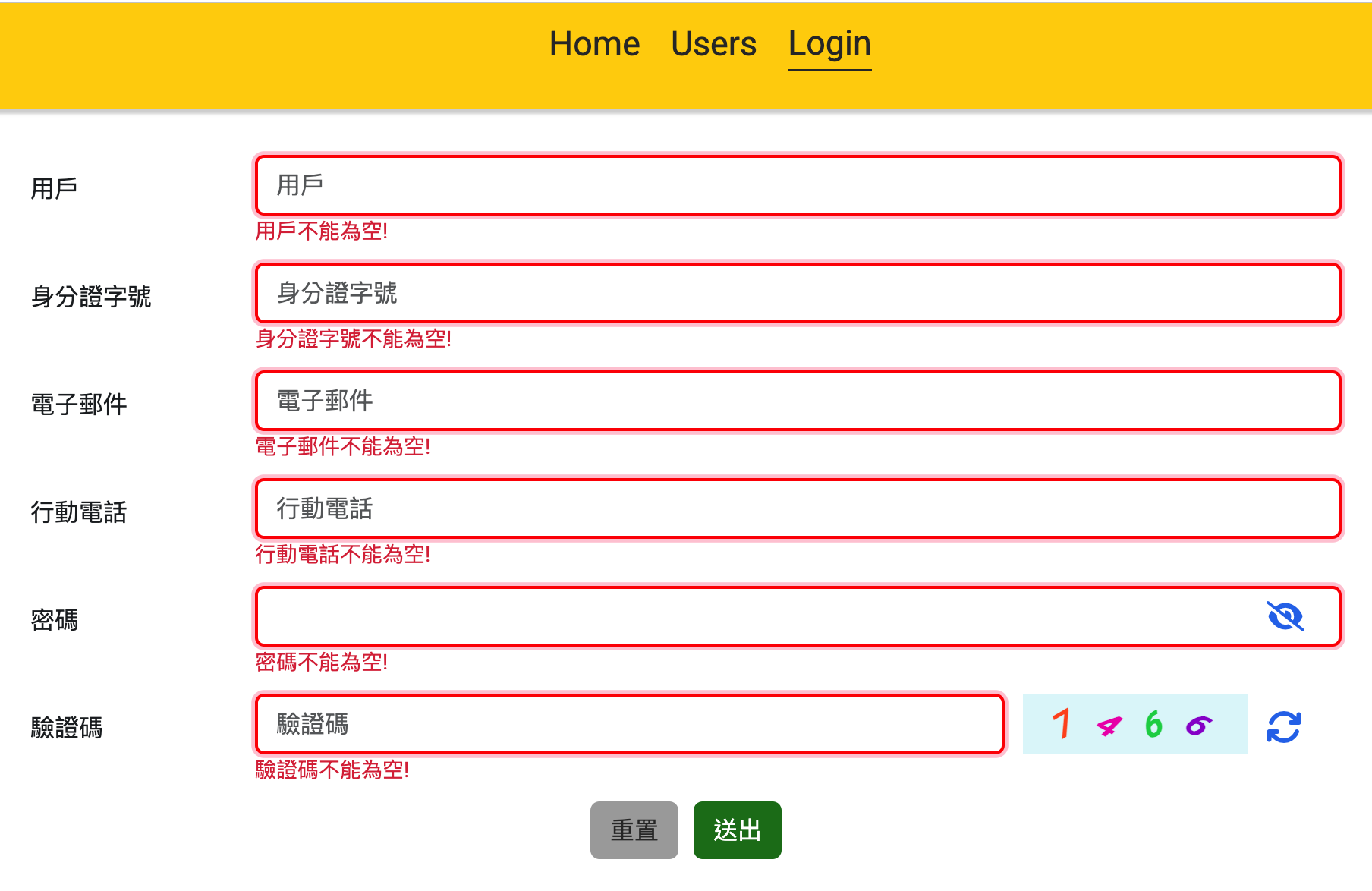
input 雙向綁定 [(ngModel)]="form.username" Ts引入 FormsModule

input 綁定 #username=”ngModel”
input 綁定name name="username"
input 綁定required required
input 綁定minlength minlength="ˇ"
input 綁定pattern pattern="^09\d{8}$"

input (change)="onChangeName(username)"
(change)行為函式onChangeName帶入參數username,
console.log(username)
// touched 觸擊
// invalid 無效
// errors 錯誤 [‘required’] 或 [‘minlength’] 或 [‘pattern’]

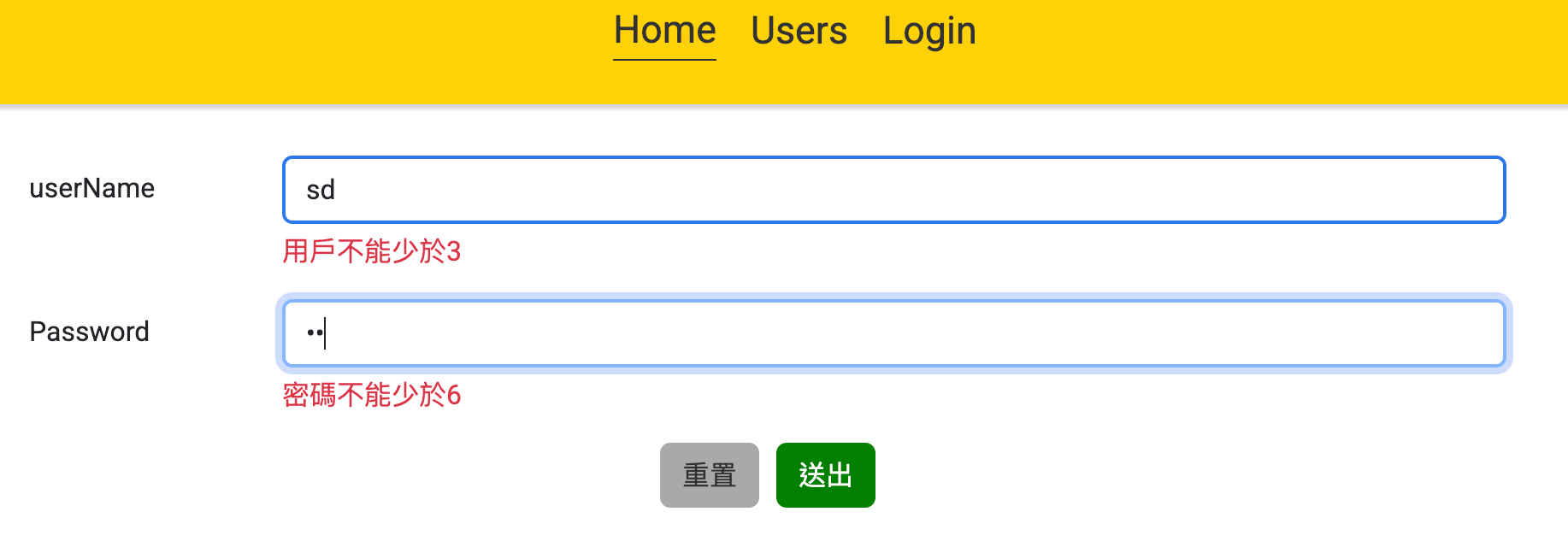
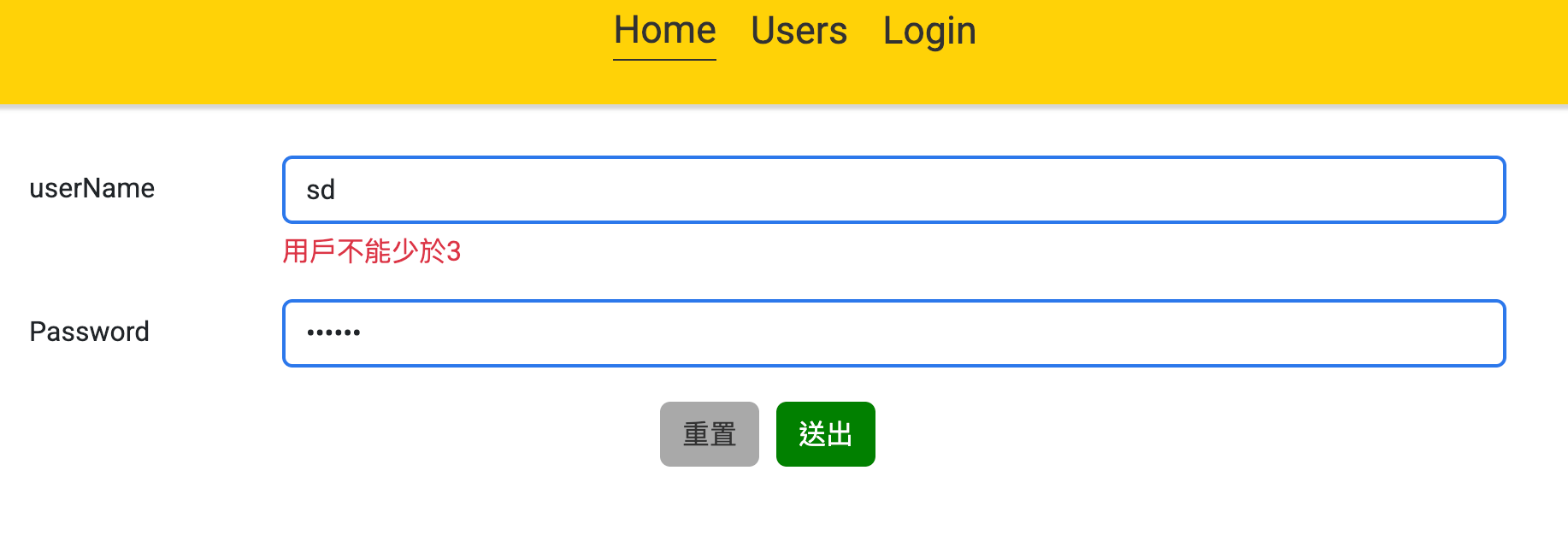
如果觸擊並且無效 或是 usernameMessage
*ngIf="username.touched && username.invalid || usernameMessage"

form 綁定#loginForm=”ngForm” 點擊 (ngSubmit)=”loginSubmit(loginForm)
< form #loginForm="ngForm" (ngSubmit)="loginSubmit(loginForm)" >
loginSubmit(loginForm) 函式 獲得參數=> 如果不等於空時,跳出驗證

1
2
3
4
5
6
7
8
9
10
11
12
13
14
15
16
17
18
19
20
21
22
23
24
25
26
27
28
29
30
31
32
33
34
35
36
37
38
39
40
41
42
43
44
45
46
47
48
49
50
51
52
53
54
55
56
57
58
59
60
61
62
63
64
65
66
67
68
69
70
71
72
73
74
75
76
77
78
79
80
81
82
83
84
85
86
87
88
89
90
91
92
93
94
95
96
97
98
99
100
101
102
103
104
105
106
107
108
109
110
111
112
113
114
115
116
117
118
119
120
121
122
123
124
125
126
127
128
129
130
131
132
133
134
135
136
137
138
139
140
141
142
143
144
145
146
147
148
149
150
151
152
153
154
155
156
157
158
159
160
161
162
163
164
165
166
167
168
169
170
171
  <div class="form_conatiner">
<form #loginForm="ngForm" (ngSubmit)="loginSubmit(loginForm)">
<div class="mb-3 row">
<!--用戶-->
<label for="username" class="col-sm-2 col-form-label">用戶</label>
<div class="col-sm-10">
<input
#username="ngModel"
[(ngModel)]="form.username"
(change)="onChangeName(username)"
[ngClass]="{'error_border':username.touched && username.errors?.['required'] || username.touched && username.errors?.['minlength'] || usernameMessage }"
minlength="3"
required
type="text"
name="username"
class="form-control" id="username" placeholder="用戶">
<small class="text-danger mt-1"
*ngIf="username.touched && username.invalid || usernameMessage">
<div *ngIf="username.errors?.['required']"> 用戶不能為空!</div>
<div *ngIf="username.errors?.['minlength']"> 用戶不能少於3!</div>
</small>
</div>
</div>
<!--身分證字號-->
<div class="mb-3 row">
<label for="identity" class="col-sm-2 col-form-label">身分證字號</label>
<div class="col-sm-10">
<input
#identity="ngModel"
[(ngModel)]="form.identity"
(change)="onChangeIdentity(identity)"
[ngClass]="{'error_border':identity.touched && identity.errors?.['required'] || identity.errors?.['pattern'] || identityMessage }"
name="identity"
pattern="^[A-Za-z][12]\d{8}$"
required
type="text"
class="form-control"
id="identity"
placeholder="身分證字號"
>
<small class="text-danger mt-1"
*ngIf="identity.touched && identity.invalid || identityMessage">
<div *ngIf="identity.errors?.['required']"> 身分證字號不能為空!</div>
<div *ngIf="identity.errors?.['pattern']"> 身分證字號規格不符!</div>
</small>
</div>
</div>
<!--電子郵件-->
<div class="mb-3 row">
<label for="email" class="col-sm-2 col-form-label">電子郵件</label>
<div class="col-sm-10">
<input
#email="ngModel"
[(ngModel)]="form.email"
(change)="onChangeEmail(email)"
[ngClass]="{'error_border':email.touched && email.errors?.['required'] || email.errors?.['pattern'] || emailMessage }"
name="email"
pattern="^[a-zA-Z0-9_.+-]+@[a-zA-Z0-9-]+\.[a-zA-Z0-9-.]+$"
required
type="text"
class="form-control"
id="email"
placeholder="電子郵件"
>
<small class="text-danger mt-1"
*ngIf="email.touched && email.invalid || emailMessage">
<div *ngIf="email.errors?.['required']">電子郵件不能為空!</div>
<div *ngIf="email.errors?.['pattern']">電子郵件規格不符!</div>
</small>
</div>
</div>
<!--行動電話-->
<div class="mb-3 row">
<label for="phone" class="col-sm-2 col-form-label">行動電話</label>
<div class="col-sm-10">
<input
#phone="ngModel"
[(ngModel)]="form.phone"
(change)="onChangePhone(phone)"
[ngClass]="{'error_border':phone.touched && phone.errors?.['required'] || phone.errors?.['pattern'] || phoneMessage }"
pattern="^09\d{8}$"
name="phone"
type="text"
required
id="phone"
placeholder="行動電話"
class="form-control">
<small class="text-danger mt-1"
*ngIf="phone.touched && phone.invalid || phoneMessage">
<div *ngIf="phone.errors?.['required']"> 行動電話不能為空!</div>
<div *ngIf="phone.errors?.['pattern']"> 行動電話09開頭規格不符!</div>
</small>
</div>
</div>
<!--密碼-->
<div class="mb-3 row">
<label for="password" class="col-sm-2 col-form-label">密碼</label>
<div class="col-sm-10">
<div class="password">
<input
#password="ngModel"
(change)="onChangePassword(password)"
[ngClass]="{'error_border':password.touched && password.errors?.['required'] || password.touched && password.errors?.['minlength'] || passwordMessage }"
type="password"
[type]="isSeePassword ? 'text' : 'password'"
name="password"
minlength="6"
required
ng-model="inputText"
[(ngModel)]="form.password"
class="form-control"
placeholder="{{passwordPlaceholder}}"
id="password">
<i class="fa-solid fa-eye-slash"
[ngClass]="{'fa-eye':isSeePassword}"
(click)="SeePassword()"></i>
</div>
<small class="text-danger mt-1"
*ngIf="password.touched && password.invalid || passwordMessage">
<div *ngIf="password.errors?.['required']"> 密碼不能為空!</div>
<div *ngIf="password.errors?.['minlength']"> 密碼不能少於6!</div>
</small>
</div>
</div>
<!--驗證碼-->
<div class="mb-3 row verificationCode">
<label for="verificationCode" class="col-sm-2 col-form-label">驗證碼</label>
<div class="col-sm-7">
<input
#verificationCode="ngModel"
[(ngModel)]="form.verificationCode"
(change)="onChangeVerificationCode(verificationCode)"
[ngClass]="{'error_border':
verificationCode.touched && verificationCode.errors?.['required'] ||
form.verificationCode!='' &&newVerificationCode!=form.verificationCode || verificationCodeMessage
}"
minlength="4"
name="verificationCode"
type="text"
required
id="verificationCode"
placeholder="驗證碼"
class="form-control">
<small class="text-danger mt-1"
*ngIf="verificationCode.touched && verificationCode.invalid || verificationCodeMessage" >
<div *ngIf="verificationCode.errors?.['required']">驗證碼不能為空!</div>
<div *ngIf="form.verificationCode!='' &&newVerificationCode!=form.verificationCode">{{verificationCodeValue}}</div>
</small>
</div>
<!--驗證碼顯示-->
<div class="col-sm-2 code_box" (click)="showCode()">
<ul>
<li *ngFor="let i of code_box">
{{ i}}
</li>
</ul>
</div>
<!--點擊產生新的驗證碼-->
<div class="col-sm-1">
<i (click)="showCode()" class="fa-solid fa-arrows-rotate"></i>
</div>
</div>
<div class="btn_group">
<button class="btn btn-outline-secondary" type="submit">重置</button>
<button class="btn btn-outline-primary ml-2"
[disabled]="usernameMessage || identityMessage || emailMessage || phoneMessage|| passwordMessage ||verificationCodeMessage"
type="submit">送出</button>
</div>
</form>
</div>

ts

1
2
3
4
5
6
7
8
9
10
11
12
13
14
15
16
17
18
19
20
21
22
23
24
25
26
27
28
29
30
31
32
33
34
35
36
37
38
39
40
41
42
43
44
45
46
47
48
49
50
51
52
53
54
55
56
57
58
59
60
61
62
63
64
65
66
67
68
69
70
71
72
73
74
75
76
77
78
79
80
81
82
83
84
85
86
87
88
89
90
91
92
93
94
95
96
97
98
99
100
101
102
103
104
105
106
107
108
109
110
111
112
113
114
115
116
117
118
119
120
121
122
123
124
125
126
127
128
129
130
131
132
133
134
135
136
137
138
139
140
141
142
143
144
145
146
147
148
149
150
151
152
153
154
155
156
157
158
159
160
161
162
163
164
165
166
167
168
169
170
171
172
173
174
175
176
177
178
179
180
181
182
183
184
185
186
187
188
189
190
191
192
193
194
195
196
197
198
199
200
201
202
203
204
205
206
207
208
209
210
211
import { NgClass, NgFor, NgIf } from '@angular/common';
import { Component, inject, OnInit } from '@angular/core';
import { FormsModule } from '@angular/forms';
import { Router } from "@angular/router";
import { HttpProviderService } from '../api/http-provider.service';
interface formType{
username: string | undefined,
identity: string | undefined,
email: string | undefined,
phone: string | undefined,
password: string | undefined,
verificationCode: string | undefined,
}
@Component({
selector: 'app-login',
standalone:true,
imports: [FormsModule,NgFor,NgIf,NgClass],
templateUrl: './login.component.html',
styleUrl: './login.component.scss'
})

export class LoginComponent implements OnInit {
private readonly httpProvider = inject(HttpProviderService);
constructor(private router: Router) {
this.generateCode();
}
form:formType={
username: '',
identity:'',
email: '',
phone:'',
password: '',
verificationCode:''
}
// 是否看見密碼
isSeePassword:boolean = false;
SeePassword() {
this.isSeePassword = !this.isSeePassword;
}
passwordPlaceholder:string='請輸入密碼'
onChangeName(x: { value: string | any[]; touched: any; } ) {
x.value.length===0 || x.touched && x.value.length < 3 ? this.usernameMessage = true:this.usernameMessage = false;
}

onChangeIdentity(x: { value: string | any[]; } ) {
x.value.length===0 ? this.identityMessage = true:this.identityMessage = false;
}

onChangeEmail(x: { value: string | any[]; touched: any; }) {
x.value.length===0 || x.touched && x.value.length < 3 ? this.emailMessage = true:this.emailMessage = false;
}

onChangePhone(x: { value: string | any[]; touched: any; }) {
x.value.length===0 || x.touched && x.value.length < 3 ? this.phoneMessage = true:this.phoneMessage = false;
}

onChangePassword(x: { value: string | any[]; touched: any; }) {
x.value.length===0 || x.touched && x.value.length < 6 ? this.passwordMessage = true:this.passwordMessage = false;
}

verificationCodeValue = '';
onChangeVerificationCode(x: any) {
if (x.value.length===0 || x.touched ) {
this.verificationCodeMessage = true;
}
else if (x.value != '') {
if (this.newVerificationCode != x.value) {
this.verificationCodeValue = '驗證碼不正確!';
this.verificationCodeMessage = true;
} else {
this.verificationCodeMessage = false;
}
}
else {
this.verificationCodeMessage = false;
}
}
usernameMessage: boolean = false;
identityMessage: boolean = false;
emailMessage: boolean = false;
phoneMessage: boolean = false;
passwordMessage: boolean = false;
verificationCodeMessage: boolean = false;
// 用戶的表單規則:
userRule(usernameLength:number) {
switch (true) {
case usernameLength ===0 :
this.usernameMessage = true;
break;
case usernameLength <3:
this.usernameMessage = true;
break;
default:
this.usernameMessage = false;
}
}
// Identity的表單規則:正則表達式不能加引號
regIdentityRulePattern: any = /^[A-Za-z][12]\d{8}$/;
identityRule(identity: string) {
switch (true) {
case identity.length ===0 :
this.identityMessage = true;
break;
case !this.regIdentityRulePattern.test(identity):
this.identityMessage = true;
break;
default:
this.identityMessage = false;
}
}
//電子郵件的表單規則:正則表達式不能加引號
regMailRulePattern:any= /^[a-zA-Z0-9_.+-]+@[a-zA-Z0-9-]+\.[a-zA-Z0-9-.]+$/;
emailRule(email: string) {
switch (true) {
case email.length ===0 :
this.emailMessage = true;
break;
case !this.regMailRulePattern.test(email):
this.emailMessage = true;
break;
default:
this.emailMessage = false;
}
}
//行動電話的表單規則:正則表達式不能加引號
regPhoneRulePattern:any= /^09\d{8}$/;
phoneRule(phone:string) {
switch (true) {
case phone.length ===0 :
this.phoneMessage = true;
break;
case !this.regPhoneRulePattern.test(phone):
this.phoneMessage = true;
break;
default:
this.phoneMessage = false;
}
}
// 密碼的表單規則
passwordRule(passwordLength:number) {
switch (true) {
case passwordLength ===0 :
this.passwordMessage = true;
break;
case passwordLength <6:
this.passwordMessage = true;
break;
default:
this.passwordMessage = false;
}
}
// 驗證碼的表單規則
verificationCodeRule(verificationCode:string) {
switch (true) {
case verificationCode.length ===0 :
this.verificationCodeMessage = true;
break;
case this.verificationCodeValue==='驗證碼不正確!':
this.passwordMessage = true;
break;
default:
this.verificationCodeMessage = false;
}
}

loginSubmit(loginForm: any) {
this.userRule(loginForm.value.username.length)
this.identityRule(loginForm.value.identity)
this.emailRule(loginForm.value.email)
this.phoneRule(loginForm.value.phone)
this.passwordRule(loginForm.value.password.length)
this.verificationCodeRule(loginForm.value.verificationCode)
if (this.emailMessage || this.phoneMessage || this.passwordMessage ) {
console.log('表單漏填');
console.log(this.emailMessage ,this.phoneMessage,this.passwordMessage );
} else {
console.log('loginForm',loginForm)
let query = {
email: loginForm.email,
password: loginForm.password,
}
this.httpProvider.login(query).subscribe({
next: (res: any) => {
localStorage.setItem('token', res.token);
this.router.navigate(["test_login"]);
}
})
}
}

code_box: object | null | undefined | any = [];
newVerificationCode: string = ''
// 產生認證碼
generateCode(length=4) {
let chars = "0123456789";
let code = "";
for (var i = 0; i < length; i++) {
code += chars.charAt(Math.floor(Math.random() * chars.length));
}
this.newVerificationCode = code;
//驗證碼分割
this.code_box = code.split('');
}
//點擊獲得新的驗證碼
showCode() {
this.generateCode();
}
ngOnInit(): void {
console.log('typeof this.usernameMessage 判斷型別',typeof this.usernameMessage)
}
}
表單驗證github
參考資料

Angular Ng-bootstrap

@ng-bootstrap/ng-bootstrap官網

安裝語法

1
ng add @ng-bootstrap/ng-bootstrap

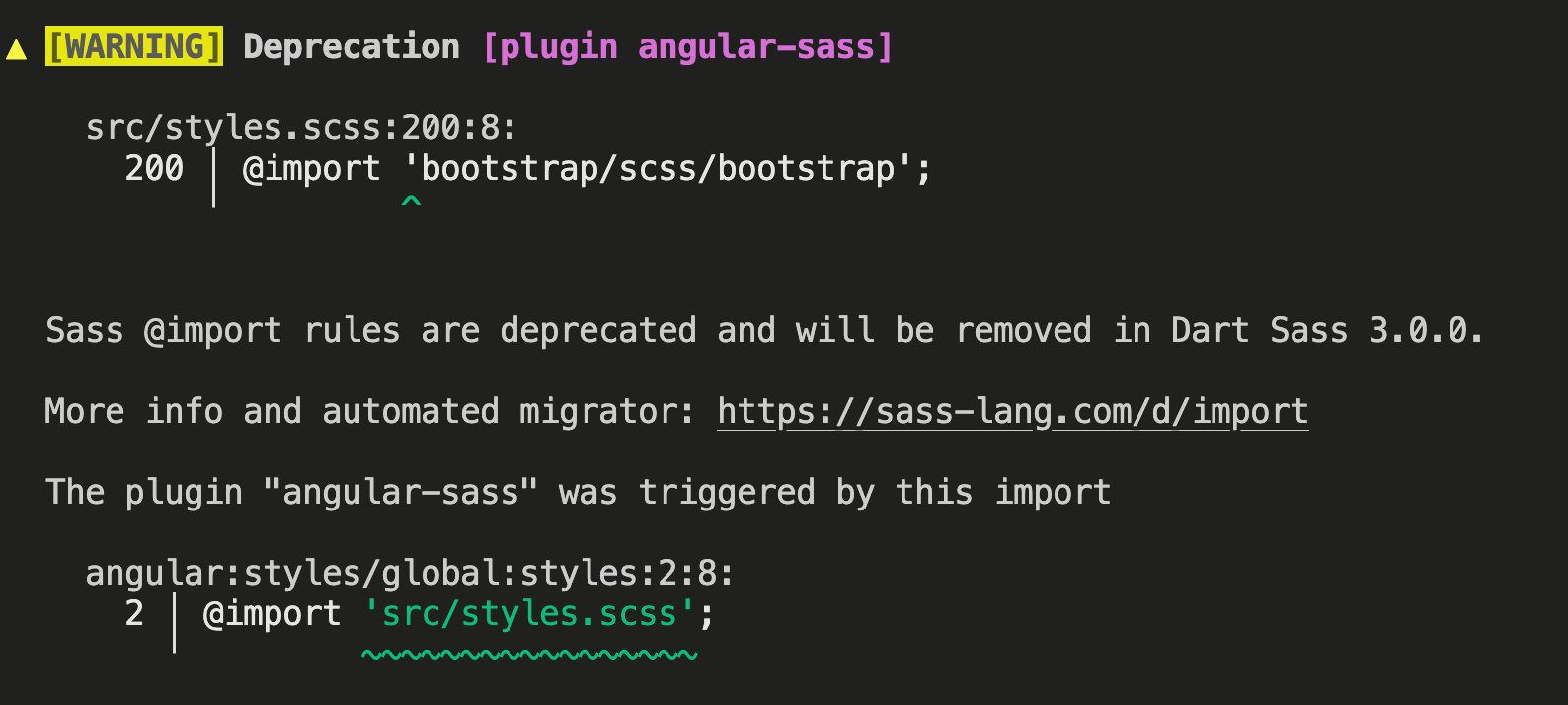
錯誤訊息 Sass @import rules are deprecated and will be removed in Dart Sass 3.0.0.

Sass @import rules are deprecated and will be removed in Dart Sass 3.0.0.

More info and automated migrator: https://sass-lang.com/d/import

The plugin “angular-sass” was triggered by this import

angular:styles/global:styles:2:8:
  2 │ @import 'src/styles.scss';
    ╵         ~~~~~~~~~~~~~~~~~
處理方式 angular.json/ "projects": { "vite_angular19_st_project": { "architect": { "build": { "options": { 加在這裡 } } } } }
1
2
3
4
5
6
7
8
9
10
11
12
13
14
15
16
17
18
19
20
21
22
23
24
25
26
27
28
29
30
31
32
33
"projects": {
"vite_angular19_st_project": {
"architect": {
"build": {
"options": {
+新增在這裡
"stylePreprocessorOptions": {
"sass": {
"silenceDeprecations": [
"mixed-decls",
"color-functions",
"global-builtin",
"import"
]
}
},

}
}
}
}

新增
"stylePreprocessorOptions": {
"sass": {
"silenceDeprecations": [
"mixed-decls",
"color-functions",
"global-builtin",
"import"
]
}
},

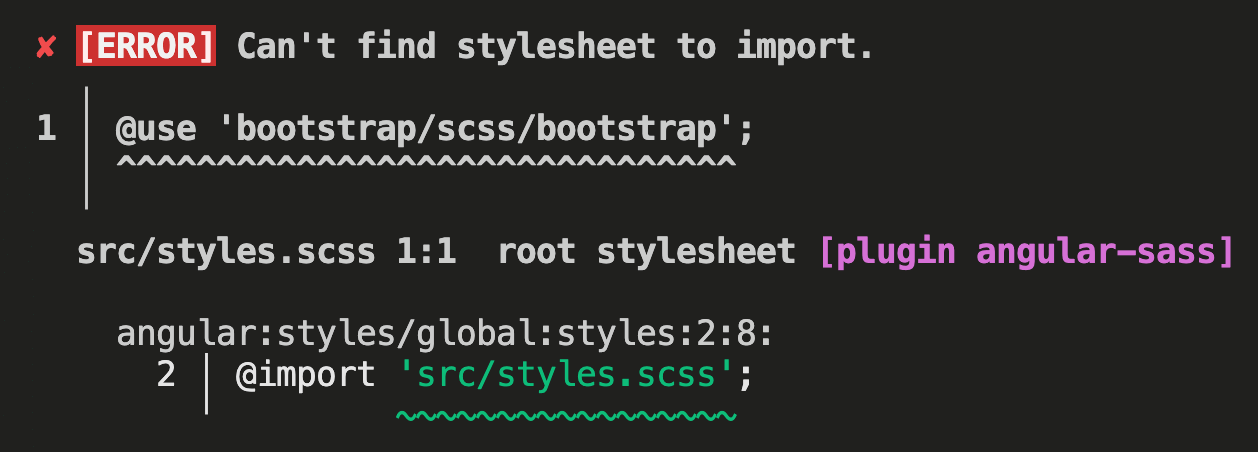
錯誤訊息 [ERROR] Can’t find stylesheet to import.

✘ [ERROR] Can’t find stylesheet to import.

1 │ @use ‘bootstrap/scss/bootstrap’;

處理方式 安裝 bootstrap,如果安裝完成package.json 會出現”dependencies” 內 “bootstrap”: “^5.3.5”,”@popperjs/core”: “^2.11.8”,

1
npm install --save bootstrap

styles.scss引入 bootstrap

1
@use 'bootstrap/scss/bootstrap';

測試Html

1
2
3
4
5
6
7
8
9
10
11
12
13
14
15
16
17
18
19
20
21
22
23
24
25
26
27
28
29
30
31
32
33
<ng-template #content let-modal>
<div class="modal-header">
<h4 class="modal-title" id="modal-basic-title">Profile update</h4>
<button type="button" class="btn-close" aria-label="Close" (click)="modal.dismiss('Cross click')"></button>
</div>
<div class="modal-body">
<form>
<div class="mb-3">
<label for="dateOfBirth">Date of birth</label>
<div class="input-group">
<input
id="dateOfBirth"
class="form-control"
placeholder="yyyy-mm-dd"
name="dp"
ngbDatepicker
#dp="ngbDatepicker"
/>
<button class="btn btn-outline-secondary bi bi-calendar3" (click)="dp.toggle()" type="button"></button>
</div>
</div>
</form>
</div>
<div class="modal-footer">
<button type="button" class="btn btn-outline-secondary" (click)="modal.close('Save click')">Save</button>
</div>
</ng-template>

<button class="btn btn-lg btn-outline-primary" (click)="open(content)">Launch demo modal</button>

<hr />

<pre>{{ closeResult() }}</pre>

TS

1
2
3
4
5
6
7
8
9
10
11
12
13
14
15
16
17
18
19
20
21
22
23
24
25
26
27
28
29
30
31
32
33
34
35
import { Component, inject, signal, TemplateRef, WritableSignal } from '@angular/core';

import { ModalDismissReasons, NgbDatepickerModule, NgbModal } from '@ng-bootstrap/ng-bootstrap';

@Component({
selector: 'ngbd-modal-basic',
imports: [NgbDatepickerModule],
templateUrl: './modal-basic.html',
})
export class NgbdModalBasic {
private modalService = inject(NgbModal);
closeResult: WritableSignal<string> = signal('');

open(content: TemplateRef<any>) {
this.modalService.open(content, { ariaLabelledBy: 'modal-basic-title' }).result.then(
(result) => {
this.closeResult.set(`Closed with: ${result}`);
},
(reason) => {
this.closeResult.set(`Dismissed ${this.getDismissReason(reason)}`);
},
);
}

private getDismissReason(reason: any): string {
switch (reason) {
case ModalDismissReasons.ESC:
return 'by pressing ESC';
case ModalDismissReasons.BACKDROP_CLICK:
return 'by clicking on a backdrop';
default:
return `with: ${reason}`;
}
}
}

Model範例

Angular 打包

Angular 打包

打包指令

1
ng build

angular.json內的設定:

1
2
3
4
5
6
7
8
9
10
11
12
13
14
15
16
17
18
19
20
21
22
23
24
25
26
27
28
29
30
31
32
33
34
35
36
37
38
39
40
41
42
43
44
45
46
47
48
49
50
51
52
53
54
55
56
57
58
59
60
61
62
63
64
65
66
67
68
69
70
71
72
73
74
75
76
77
78
79
80
81
82
83
84
85
86
87
88
89
90
91
92
93
94
95
96
97
98
99
100
101
102
103
104
105
106
107
108
109
110
111
112
113
114
115
116
117
118
119
120
121
{
"$schema": "./node_modules/@angular/cli/lib/config/schema.json",
"version": 1,
"newProjectRoot": "projects",
"projects": {
"vite_angular19_todo_project": {
"projectType": "application",
"schematics": {
"@schematics/angular:component": {
"style": "scss"
}
},
"root": "",
"sourceRoot": "src",
"prefix": "app",
"architect": {
"build": {
"builder": "@angular-devkit/build-angular:application",
"options": {
+ "allowedCommonJsDependencies": [
+ "dayjs"
+ ],
+ "outputPath": "dist",
"index": "src/index.html",
"browser": "src/main.ts",
"polyfills": [
"zone.js"
],
"tsConfig": "tsconfig.app.json",
"inlineStyleLanguage": "scss",
"assets": [
{
"glob": "**/*",
"input": "public"
}
],
"styles": [
"@angular/material/prebuilt-themes/azure-blue.css",
+ "bootstrap/dist/css/bootstrap.min.css",
"src/styles.scss"
],
"scripts": [
+ "jquery/dist/jquery.min.js",
+ "popper.js/dist/umd/popper.min.js",
+ "bootstrap/dist/js/bootstrap.min.js"
],
"server": "src/main.server.ts",
"prerender": true,
"ssr": {
"entry": "src/server.ts"
}
},
"configurations": {
"production": {
"budgets": [
{
"type": "initial",
"maximumWarning": "50MB",
"maximumError": "10MB"
},
{
"type": "anyComponentStyle",
"maximumWarning": "50MB",
"maximumError": "10MB"
}
],
"outputHashing": "all"
},
"development": {
"optimization": true,
"extractLicenses": false,
"sourceMap": true
}
},
"defaultConfiguration": "production"
},
"serve": {
"builder": "@angular-devkit/build-angular:dev-server",
"configurations": {
"production": {
"buildTarget": "vite_angular19_todo_project:build:production"
},
"development": {
"buildTarget": "vite_angular19_todo_project:build:development"
}
},
"defaultConfiguration": "development"
},
"extract-i18n": {
"builder": "@angular-devkit/build-angular:extract-i18n"
},
"test": {
"builder": "@angular-devkit/build-angular:karma",
"options": {
"polyfills": [
"zone.js",
"zone.js/testing"
],
"tsConfig": "tsconfig.spec.json",
"inlineStyleLanguage": "scss",
"assets": [
{
"glob": "**/*",
"input": "public"
}
],
"styles": [
"@angular/material/prebuilt-themes/azure-blue.css",
"src/styles.scss"
],
"scripts": []
}
}
}
}
},
"cli": {
"analytics": "e07e021f-8e3d-4f1f-9cd5-d9911e112b15"
}
}

允許 CommonJs 依賴項
### 錯誤訊息 打包時 [WARNING] Module 'dayjs' used by 'src/app/home/home.component.ts' is not ESM
處理方式
angular.json 檔案內=>"projects"=> "vite_project" => "architect" => "build" => "options" allowedCommonJsDependencies(允許 CommonJs 依賴項):["dayjs"]
1
2
3
4
5
6
7
8
9
10
11
12
13
14
15
 {
"projects":{
"vite_project":{
"architect":{
"build":{
"options":{
+ "allowedCommonJsDependencies": [
+ "dayjs"
+ ],
}
}
}
}
}
}

錯誤訊息 打包時 bundle exceeded maximun. Budget 500kb was not met by ….
捆綁包超出最大值。預算 500 kb 未達
如圖

處理方式
angular.json 檔案內 budgets捆綁initial最初 與 anyComponentStyle任何組件樣式 =>maximumWarning 最大警告 =>maximumError最大誤差
1
2
3
4
5
6
7
8
9
10
11
12
13
14
15
16
17
18
19
20
21
22
23
24
25
26
{
"projects":{
"vite_project":{
"architect":{
"build":{
"configurations": {
"production": {
"budgets":[
{
"type": "initial",
+ "maximumWarning": "50MB",
+ "maximumError": "10MB"
},
{
"type": "anyComponentStyle",
+ "maximumWarning": "50MB",
+ "maximumError": "10MB"
}
]
}
}
}
}
}
}
}
打包路徑
1
"outputPath": "dist",
打包以後
注意要更改js 與css 的位址改為正確。

✘ [ERROR] The ‘index/product/:id’ route uses

✘ [ERROR] The ‘index/product/:id’ route uses prerendering and includes parameters, but ‘getPrerenderParams’ is missing. Please define ‘getPrerenderParams’ function for this route in your server routing configuration or specify a different ‘renderMode’.

處理方式
1
2
3
4
5
6
7
8
9
import { RenderMode, ServerRoute } from '@angular/ssr';

export const serverRoutes: ServerRoute[] = [
{
path: '**',
+ renderMode: RenderMode.Server
}
];

Angular Service 獨立管理

RxJS 的 BehaviorSubject

利用 RxJS 的 BehaviorSubject,將原本儲存在各 Component 中的狀態,集中儲存在 Service 中,以方便各階層的元件透過 DI 存取,而不需要透過元件間的互動來傳遞狀態數值。

Api Service 獨立管理

Configures Angular’s HttpClient service to be available for injection.
配置 Angular 的 HttpClient 服務以供注入。
provideHttpClient
src/app/app.config.ts

錯誤訊息:ERROR NullInjectorError: R3InjectorError(Environment Injector)[_ProductsService -> _ApiService -> _HttpClient -> _HttpClient]:
處理方式如下
引入 provideHttpClient
1
2
3
4
5
6
7
8
9
10
11
12
13
import { ApplicationConfig, provideZoneChangeDetection } from '@angular/core';
import { provideRouter } from '@angular/router';
+ import {provideHttpClient} from '@angular/common/http';
import { routes } from './app.routes';

export const appConfig: ApplicationConfig = {
providers: [provideZoneChangeDetection({ eventCoalescing: true }), provideRouter(routes)]
providers: [
provideZoneChangeDetection({ eventCoalescing: true }),
+ provideHttpClient(),
provideRouter(routes)
]
};
新增 api資料夾 http-provider.service.ts 與 web-api.service.ts 官網Injectable 注入
Injectable: 裝飾器將某個類別標記為可用,可以作為依賴項提供和注入。
Observable:
透過網路傳輸來取得,則是屬於「非同步任務」,理由是需要連線到伺服器,使用者的應用程式必須等待伺服器回傳資料。
參考資料
1
2
3
4
5
6
7
8
9
10
11
12
13
14
15
16
17
18
19
20
21
22
23
24
25
26
27
28
29
30
31
32
33
34
35
36
37
38
39
40
//web-api.service.ts
import { Injectable, inject } from '@angular/core';
import { HttpClient, HttpHeaders } from '@angular/common/http';
import { Observable, throwError } from 'rxjs';
import { catchError } from 'rxjs/operators';

@Injectable({ providedIn: 'root' })
export class WebApiService {
private readonly http = inject(HttpClient);

private readonly httpOptions = {
headers: new HttpHeaders({ 'Content-Type': 'application/json' })
};

get(url: string): Observable<any> {
return this.http.get(url, this.httpOptions)
.pipe(catchError(this.handleError));
}

post(url: string, model: any): Observable<any> {
return this.http.post(url, model, this.httpOptions)
.pipe(catchError(this.handleError));
}

put(url: string, model: any): Observable<any> {
return this.http.put(url, model, this.httpOptions)
.pipe(catchError(this.handleError));
}

delete(url: string): Observable<any> {
return this.http.delete(url, this.httpOptions)
.pipe(catchError(this.handleError));
}

private handleError(error: any) {
console.error('API 錯誤:', error);
return throwError(() => new Error(error.message || '錯誤已消失'));
}
}

http-provider.service.ts

1
2
3
4
5
6
7
8
9
10
11
12
13
14
15
16
17
18
19
20
21
22
23
24
25
26
27
28
29
30
31
32
33
34
35
36
37
38
39
40
41
42
43
44
import { Injectable, inject } from '@angular/core';
import { Observable } from 'rxjs';
import { WebApiService } from './web-api.service';
import { environment } from '../../environment/environment';
import dayjs from 'dayjs'

@Injectable({ providedIn: 'root' })

export class HttpProviderService {
private readonly apiUrl = environment.apiUrl;
private readonly webApiService = inject(WebApiService);

getAllLists(): Observable<any> {
return this.webApiService.get(`${this.apiUrl}/api/toDoLists`);
}
// 編輯
deleteTodoById(_id: string): Observable<any> {
return this.webApiService.delete(`${this.apiUrl}/api/toDo/${encodeURIComponent(_id)}`);
}

getTodoById(id: string): Observable<any> {
return this.webApiService.get(`${this.apiUrl}/api/toDo/${encodeURIComponent(id)}`);
}
// 新增
addList(newTask: string): Observable<any> {
let query:any = {
title: newTask,
buildDate: Date.now(),
updataDate: Date.now(),
}
return this.webApiService.post(`${this.apiUrl}/api/toDo`,query);
}

// 編輯
updateTodo(item: any): Observable<any> {
let query:any = {
title: item.title,
buildDate: dayjs(item.buildDate).valueOf(),//改為時間搓
updataDate: Date.now(),
}
return this.webApiService.put(`${this.apiUrl}/api/toDo/${encodeURIComponent(item._id)}`, query);
}
}

頁面的引入

1
2
3
4
5
6
7
8
9
10
11
12
13
14
15
16
17
18
19
20
21
22
23
24
25
26
27
28
29
30
31
32
33
34
35
36
37
38
39
40
41
42
43
44
45
+ import { HttpProviderService } from '../api/http-provider.service';
import { addListsType } from '../Types/toDo';
import dayjs from 'dayjs'
@Component({
selector: 'app-home',
imports: [CommonModule,RouterModule,FormsModule,ToDoListsComponent ],
templateUrl: './home.component.html',
styleUrl: './home.component.scss'
})

+ export class HomeComponent implements OnInit {
+ private readonly httpProvider = inject(HttpProviderService);
}
todoLists = <addListsType[] >([]);
//獲取數據
async getAllList() {
this.httpProvider.getAllLists().pipe(
tap(lists => {
let arrLists:any[] = [];
lists.map(function(item: any) {
let query: any = {
_id: item._id,
title: item.title,
Editing: false, // 編輯
Status: false, //選取狀態
CanEdit: true, //可以編輯
buildDate: dayjs(item.buildDate).format('YYYY-MM-DD HH:mm'),
updataDate: dayjs(item.updataDate).format('YYYY-MM-DD HH:mm'),
};
arrLists.push(query);
// 排序
arrLists.sort((a, b) => {
return dayjs(b.buildDate).valueOf() - dayjs(a.buildDate).valueOf()
})

});
this.todoLists = arrLists;
}),
catchError((error: any) => {
console.error("獲取錯誤:", error);
return of([]);
})
).subscribe();

}

使用 BehaviorSubject 的狀態儲存器

Subject
Subject 可以接受 Observer 的訂閱。 也可以用來訂閱其他的 Observable,所以他本身既是 Observable 又是 Observer。

BehaviorSubject 繼承自 Subject具有同樣的功能,然而兩者最主要的差異,在於:

  1. BehaviorSubject 可以接受給定初值,而 Subject 不可以。
  2. Subject 只會在被訂閱之後,而所訂閱的 Observable 有發出新值時,才會做通知。而 BehaviorSubject 會在每一 Observer 訂閱時,對其發出目前已收到的最新值。
也因此 BehaviorSubject 這種類似『狀態暫存』的模式,很適合用來做狀態管理之用。
參考資料

Css nth-child 選擇器

nth-child(even) 雙數

css

1
2
3
4
5
6
7
ul li{
padding:5px;
}
ul li:nth-child(even){
background-color:green;
color:white;
}

Scss

1
2
3
4
5
6
7
8
9
ul {
li{
padding:5px;
&:nth-child(even){
background-color:#ffd207;
color:white;
}
}
}

nth-child(odd) 單數

css

1
2
3
4
5
6
7
ul li{
padding:5px;
}
ul li:nth-child(odd){
background-color:green;
color:white;
}

Scss

1
2
3
4
5
6
7
8
9
ul {
li{
padding:5px;
&:nth-child(odd){
background-color:#ffd207;
color:white;
}
}
}

nth-child(3n) 倍數n

3n 指的是 3 乘 n,而 n 是個由0開始的固定數列 ( 就是 0123456789…n),我們就可以得到下列結果清單

1
2
3
4
5
6
7
8
9
 ul {
li{
padding:5px;
&:nth-child(3n){
background-color:#ffd207;
color:#333;
}
}
}

nth-child(an+b) 倍數an+b

3n+1

  • 3 x 0 + 1 = 1
  • 3 x 1 + 1 = 4
  • 3 x 2 + 1 = 7
  • 3 x 3 + 1 = 10
  • 3 x 4 + 1 = 13
1
2
3
4
5
6
7
8
9
 ul {
li{
padding:5px;
&:nth-child(3n+1){
background-color:#ffd207;
color:#333;
}
}
}

nth-child(an-b) 倍數an-b

3n-1

  • 3 x 0 - 1 = -1
  • 3 x 1 - 1 = 2
  • 3 x 2 - 1 = 5
  • 3 x 3 - 1 = 8
  • 3 x 4 - 1 = 11
1
2
3
4
5
6
7
8
9
 ul {
li{
padding:5px;
&:nth-child(3n-1){
background-color:#ffd207;
color:#333;
}
}
}