事件冒泡
- stopPropagation($event)
- stopPropagation(event: Event) { event.stopPropagation(); console.log('Div clicked!'); }
1 | import { Component } from '@angular/core'; |
在 HTML 元素上新增和刪除 CSS 類別。
1 | ngClass |
CSS 類別根據表達式評估的類型進行如下更新:
expression evaluation =>表達式求值
1 | <some-element [ngClass]="stringExp|arrayExp|objExp|Set">...</some-element> |
1 | <some-element [class]="'first second'">...</some-element> |
用於更新包含 HTML 元素的樣式的屬性指令。
設定一個或多個樣式屬性,指定為冒號分隔的鍵值對。關鍵是樣式名稱,帶有可選的 .
必須引入 NgStyle
1 | //[ngStyle]="{'Style':動態欄位}" |
1 | <some-element [style]="{'font-style': styleExp}">...</some-element> |
使用 npm 進行 quasar 建置。
目前使用 Node v20.17.0
1 | npm init quasar |
npx
create-quasar
? What would you like to build? › - Use arrow-keys. Return to submit.
? 您想要建造什麼? ›——使用箭頭鍵。返回提交。
❯ App with Quasar CLI, let’s go! <= 選擇這個
❯ 帶有Quasar CLI的應用程序,我們開始吧!
spa/pwa/ssr/bex/electron/capacitor/cordova
AppExtension (AE) for Quasar CLI
Quasar UI kit (Quasar UI 套件)
✔ What would you like to build? › App with Quasar CLI, let’s go!
? Project folder: › quasar-project
? Pick script type: › - Use arrow-keys. Return to submit.
Javascript
❯ Typescript <= 選擇這個
? Pick Quasar App CLI variant: › - Use arrow-keys. Return to submit.
❯ Quasar App CLI with Vite - recommended ( Quasar App CLI 與 Vite - 推薦)<= 選擇這個
Quasar App CLI with Webpack
? Project product name: (must start with letter if building mobile apps) › Quasar App
?專案產品名稱:(如果建立行動應用程序,必須以字母開頭)› Quasar App
? Project description: › A Quasar Project
? Pick a Vue component style: › - Use arrow-keys. Return to submit.
❯ Composition API with < script setup > <= 選擇這個
recommended
Composition API
Options API
? Pick your CSS preprocessor: › - Use arrow-keys. Return to submit.
❯ Sass with SCSS syntax <= 選擇這個
Sass with indented syntax
None (the others will still be available)
Instructions:
↑/↓: Highlight option
←/→/[space]: Toggle selection
a: Toggle all
enter/return: Complete answer
◉ Linting (vite-plugin-checker + ESLint + vue-tsc)
recommended
◉ State Management (Pinia)
◉ axios
◉ vue-i18n
Quasar • Generating files…
Quasar • SUCCESS • The project has been scaffolded
? Install project dependencies? (recommended) › - Use arrow-keys. Return to submit.
❯ Yes, use npm <= 選擇
No, I will handle that myself
✔ Install project dependencies? (recommended) › Yes, use npm
quasar-project@0.0.1 postinstall
quasar prepare
App • Using quasar.config.ts in “ts” format
App • Generated tsconfig.json and types files in .quasar directory
App • The app is now prepared for linting, type-checking, IDE integration, etc.
added 547 packages, and audited 548 packages in 6m
144 packages are looking for funding
run npm fund for details
found 0 vulnerabilities
Quasar • Initialized Git repository 🚀
Quasar • 初始化 Git 儲存庫
To get started:開始吧:
啟動
1
2cd quasar-project
npm run dev
Documentation can be found at: https://quasar.dev
文件可在以下網址找到:https://quasar.dev
Quasar is relying on donations to evolve. We’d be very grateful if you can
read our manifest on “Why donations are important”: https://quasar.dev/why-donate
Donation campaign: https://donate.quasar.dev
Any amount is very welcome.
If invoices are required, please first contact Razvan Stoenescu.
Please give us a star on Github if you appreciate our work:
https://github.com/quasarframework/quasar
Quasar 依靠捐贈來發展。如果你能
閱讀我們的「為什麼捐款很重要」宣言:https://quasar.dev/why-donate
捐款活動:https://donate.quasar.dev
無論數量多少,都非常歡迎。
如果需要發票,請先聯絡 Razvan Stoenescu。
如果您欣賞我們的工作,請在 Github 上給我們一顆星:
https://github.com/quasarframework/quasar
Enjoy! - Quasar Team
App • Using quasar.config.ts in “ts” format
» Reported at………… 2025/3/21 下午10:40:30
» App dir……………. /Users/larahuang/Desktop/作品集/天昕科技/quasar-project
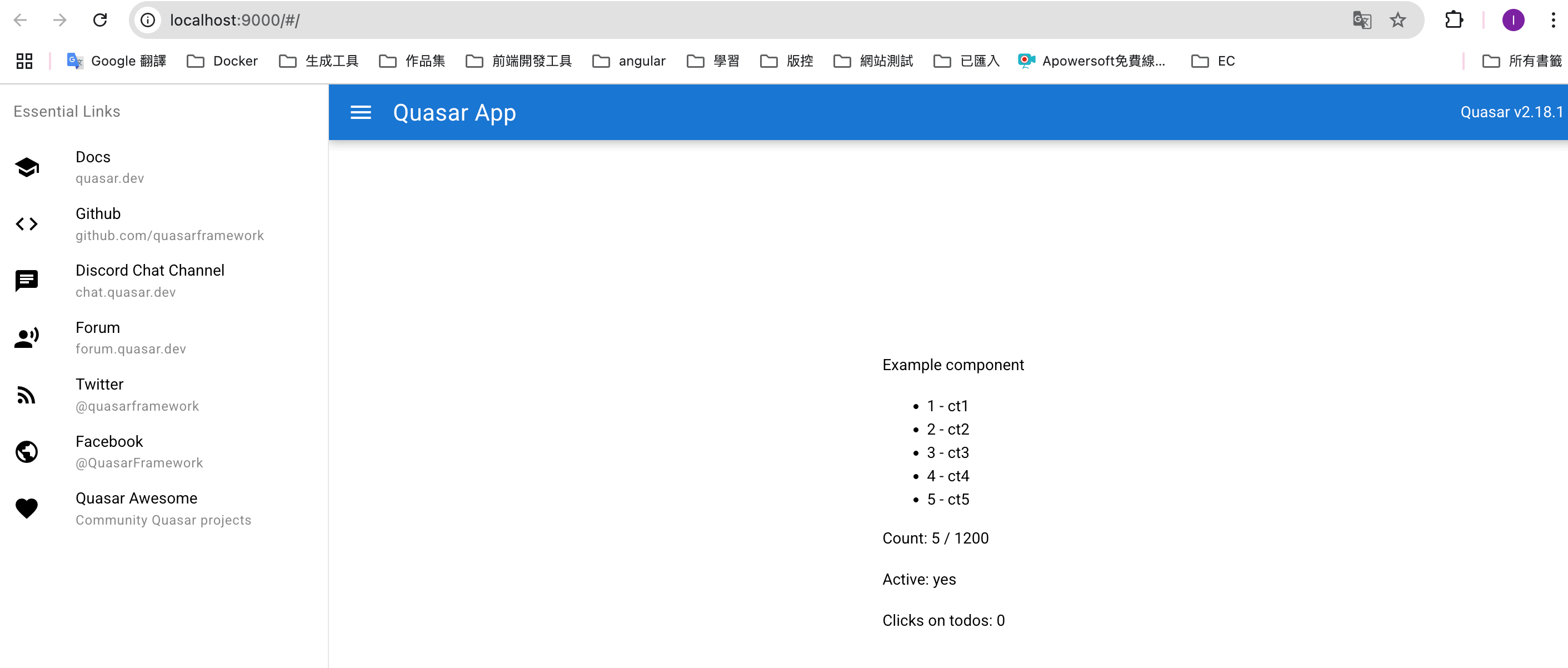
» App URL……………. http://localhost:9000/
http://192.168.25.60:9000/
» Dev mode…………… spa
» Pkg quasar…………. v2.18.1
» Pkg @quasar/app-vite… v2.1.4
» Browser target……… es2022|firefox115|chrome115|safari14
App • Opening default browser at http://localhost:9000/
1 | import {HttpClient, HttpHeaders } from '@angular/common/http'; |
上範例Ts
1 | import {HttpClient, HttpHeaders } from '@angular/common/http'; |
html
1 | <table class="table table-striped"> |
HttpClient 是 Angular 對 XMLHttpRequest 和 Fetch 的封裝
理解 HttpClient
provideHttpClient 源碼在 provider.ts
1 | export function provideHttpClient( |
1 | import { ApplicationConfig, provideZoneChangeDetection } from '@angular/core'; |
src/app 新增 api 資料夾 => 新增 web-api.service.ts
1 | import { Injectable, inject } from '@angular/core'; |
src/app 新增 api 資料夾=> 新增http-provider.service.ts
1 | import { Injectable, inject } from '@angular/core'; |
Vue 安裝
Node v20.17.0
Angular CLI 19.2.5.
1 | npm create vite@latest |
到專案內
1 | cd 專案 |
Port 4200 is already in use.
Would you like to use a different port? (Y/n)
連接埠 4200 已被使用。
您想使用其他連接埠嗎? (是/否)
Would you like to use a different port? Yes
Component HMR has been enabled.
If you encounter application reload issues, you can manually reload the page to bypass HMR and/or disable this feature with the --no-hmr command line option.
Please consider reporting any issues you encounter here: https://github.com/angular/angular-cli/issues
Browser bundles
Initial chunk files | Names | Raw size
polyfills.js | polyfills | 90.20 kB |
main.js | main | 23.25 kB |
styles.css | styles | 96 bytes |
| Initial total | 113.55 kB
Server bundles
Initial chunk files | Names | Raw size
polyfills.server.mjs | polyfills.server | 570.97 kB |
chunk-VIHJC4M4.mjs | - | 23.69 kB |
server.mjs | server | 1.39 kB |
main.server.mjs | main.server | 800 bytes |
Application bundle generation complete. [2.570 seconds]
Watch mode enabled. Watching for file changes…
NOTE: Raw file sizes do not reflect development server per-request transformations.
1 | npm install ngx-pagination --save |
Typescript
元件內的變更偵測策略,打造高效能元件
使用 OnPush
1 | import {ChangeDetectionStrategy,Component,Input,OnInit,Output,EventEmitter,} from '@angular/core'; |
html
1 | <div class="lists"> |
scss樣式
1 | .btns{ |
1 | [傳值參數]= 父元件內的傳值欄位參數 |
從app.component.ts 引入子元件
1 | import { Component } from '@angular/core'; |
app.component.html檔案內引入子元件
1 | <app-navbar |
navbar.component.ts
1 | import { NgFor,NgClass } from '@angular/common'; |
1 | <nav class="nav"> |
scss
1 | ul{ |